

1Z0-1045 Online Practice Questions and Answers
Questions 4
Which five combinations of lot and expiry date are valid scenarios in WMS Cloud? (Choose five.)
A. Two IB LPNs of the same item have different lots and the same expiry dates.
B. Two IB LPNs of the same item have the same lot and the same expiry date.
C. The IB LPNs have an item with the same lot and different expiry dates.
D. An item is lot-tracked but not expiry-date-tracked.
E. An item is expiry-date-tracked but not lot-tracked.
F. Two IB LPNs of the same item have different lots and different expiry dates.
Questions 5
In which two ways can you execute the detail cycle count of LPN Detail by sku scan? (Choose two.)
A. using "Cycle Cnt" screen with screen parameter content-count set to "sku-scan"
B. using "Cycle count for LPN deffered/immediate updates" with screen parameter sku scan mode set to "By Sku Scan"
C. using "Resv Nbr Cnt" screen and with screen parameter content-count set to "sku-scan"
D. using "Cycle Cnt" screen with screen parameter content-count set to "Null"
Questions 6
When creating an Appointment, which three "Matching value type" selections can be used to create the Appointment? (Choose three.)
A. License Plane Nbr
B. Load Nbr
C. Dock Door
D. PO Number
E. Advance Shipment Notification
F. Trailer Nbr
Questions 7
Your customer wants to Putaway LPN to Location by using the Putaway Rules and link the location with
the Replenishment Zone.
Which four configurations are required? (Choose four.)
A. Putaway Priority and Rules are set at Facility Level.
B. Set Replenishment Zone for Active Location.
C. Set the Location Size Type at Facility Level.
D. Putaway Type is set at Facility Level.
E. Set Replenishment Zone for Reserve Location.
F. Set Criteria for Putaway Rules.
Questions 8
Your client finds it easier to read reports without repeated values. The client shared an example report to demonstrate the way they want their columns to be displayed.
What action should you take to make your report look like the example report provided by client? Report A: A. Select the Hide Repeated Values icon.
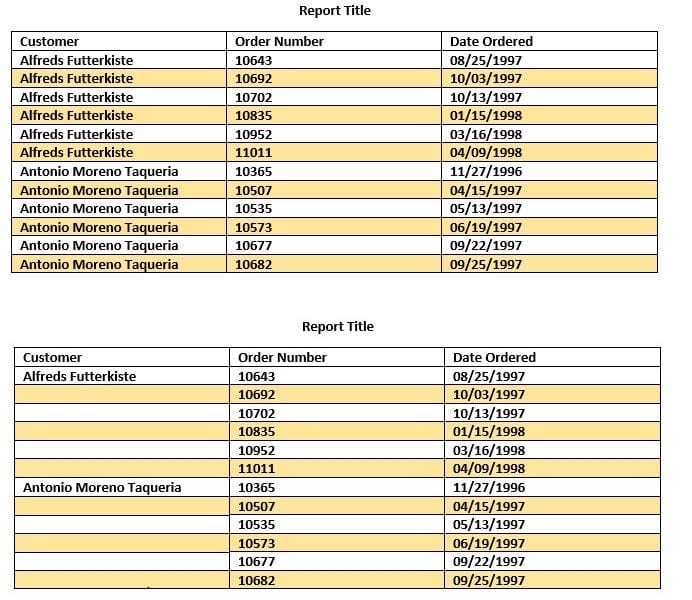
B. Select the Hid Common Values icon.
C. Select Chart Wizard, and delete repeated values.
D. Select the Suppress Duplicate Values icon.
Questions 9
Select two configurations required to fulfill a Cross Dock order. (Choose two.)
A. The Replenishment template is required to replenish Cross Dock Order
B. Wave template should be configured to allocate Cross Dock Order
C. The Cross Dock Outbound Order type should be defined
D. IB Shipment Type should be defined for Cross Dock ASN
E. Module Parameter should be enabled on the RF Receive Screen for receiving Cross Dock ASN
Questions 10
Which two data conditions on the Outbound Order will always result in unsuccessful cross-dock allocations in WMS Cloud? (Choose two.)
A. The item on the Outbound Order does not match the item on the LPN being received.
B. The quantity of the item on the Outbound Order is less than the quantity of the item on the LPM being received.
C. The quantity of the item on the Outbound Order is greater than the quantity of the item on the LPN being received.
D. The item on the Outbound Order is a batch tracked item.
E. The quantity of the item on the Outbound Order is exactly equal to the quantity of the item on the LPN being received.
Questions 11
Your company wants to use Replenishment Wave to maintain adequate inventory levels to meet customer demand by fulfilling customer's orders on time. Which Replenishment Trigger Mode needs to be set up in the Replenishment Template for the following condition? For active Location P20A100 Minimum Volume = 20 Max Volume = 100 Percentage of Max = 20% Length = 20, Width = 40, Height = 60 If location P20A100 total volume goes below 20, the location is triggered for replenishment
A. Minimum Capacity
B. Reactive
C. Order Based
D. Percentage of Max
Questions 12
Your customer wants to allocate Default Putaway Type and Drop location for the Blind IB LPNs after
Putaway.
Select the three configurations required to complete Putaway process. (Choose three.)
A. Use Putaway Type defined in Putaway Type UI screen to set PUTAWAY_TYPE Parameter in Facility Parameter UI Screen
B. Putaway Type should be defined in Putaway Type UI screen at Facility level.
C. Set DEFAULT_DROP_LOCN Parameter in Company Parameter UI screen.
D. Use Putaway Type defined in Putaway Type UI screen to set PUTAWAY_TYPE Parameter in Company parameter UI Screen.
E. Set Putaway Priority and Rules in UI Screen at Facility level.
F. Set DEFAULT_DROP_LOCN Parameter in Facility Parameter UI screen.
Questions 13
The above diagram shows a typical Third Party Logistics (3PL) structure. Identify the Facility, Company, and User levels, as applicable, in sequential order (that is, the proper label for box 1 is listed 1st in sequence).
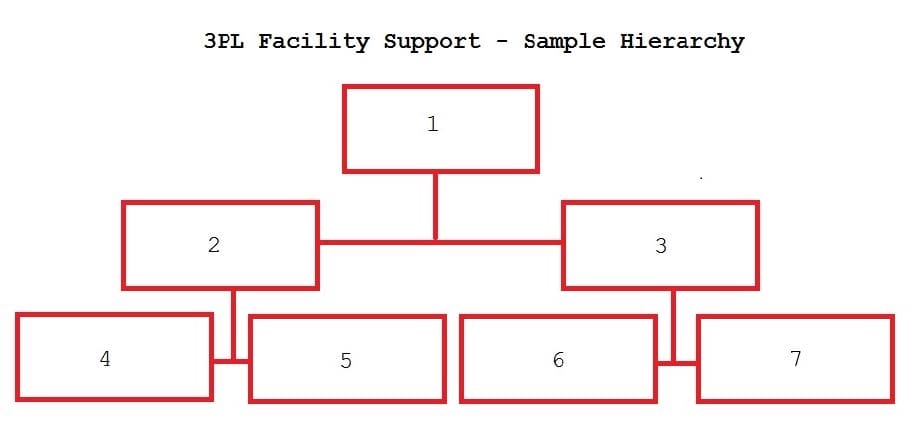
A. 1=Facility 1, 2=Company 1, 3=Company 2, 4=Super User 1, 5=Facility 2, 6=Facility 3, 7=Facility 4
B. 1=Parent 3PL, 2=Facility 1,3=Facility 2, 4=Company 1, 5=Company 2, 6=Company 3, 7=Company 1
C. 1=Company 1, 2=Parent 3PL, 3=Company 2, 4=Facility 1, 5=Facility 2, 6=Facility 3, 7=Facility 4
D. 1=Super User, 2=Parent 3PL, 3=Company 1, 4=Facility 1, 5-Facility 2, 6=Facility 3, 7=Facility 4


Home | About Us | Contact Us | FAQ | Guarantee Policy | Privacy Policy
Any charges made through this site will appear as Global Simulators Limited. All trademarks are the property of their respective owners.
Copyright © 2004-2026 pass2lead.com, All Rights Reserved.