

7230X Online Practice Questions and Answers
Questions 4
After completing Discipline 4, Determining Root Cause, of the 8D Troubleshooting Methodology, what is the next discipline to be completed?
A. Discipline 5 – Implement a Work-around
B. Discipline 5 – Implement Corrective Actions
C. Discipline 5 – Choose Corrective Actions
D. Discipline 5 – Prevent Recurrences
Questions 5
Incoming SIP Trunking calls from Service Provider to Session Manager are failing because Avaya Session Border Controller for Enterprise (SBCE) is not sending a domain name in the TO, FROM and REQUEST headers.
What needs to be changed in SBCE to make this happen?
A. In SBCE GUI, navigate to Global Profiles > Routing. Edit the Session Manager Routing Profile to link to a URI Group, which has the To, From and Request Headers and Replace Action set to Overwrite with domain name.
B. In SBCE GUI, navigate to Global Profiles > Server Configuration. Edit the Session Manager server entry to set "Overwrite Domain Name".
C. In SBCE GUI, navigate to Global Profiles > Topology Hiding. Edit the SessionManager_TH to change the To, From and Request Headers Replace Action, to Overwrite with domain name.
D. In SBCE GUI, navigate to Device Specific Settings > Endpoint Flows > Server Flows. Edit the Session Manager flow to change the End Point Policy Group to default-low.
Questions 6
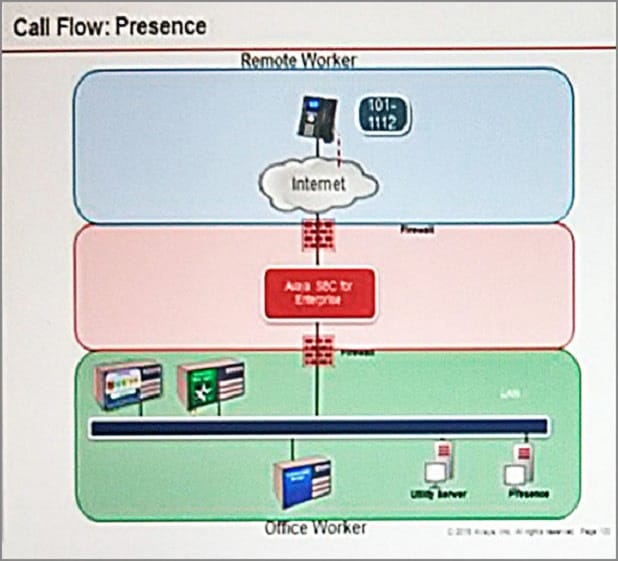
Refer to the exhibit.
SIP endpoint 101-1112 is updating its Presence status with the Avaya Aura® Presence (PS).
Based on the exhibit, which statement about the message flow is true?
A. Avaya Aura® Presence sends Notify to the telephone via Avaya Aura® Session Manager.
B. Phone sends Register message to Avaya Aura® Session Manager via Avaya Session Border Controller for Enterprise.
C. The telephone sends Subscribe message to Avaya Aura® Session Manager via Avaya Session Border Controller for Enterprise.
D. Avaya Aura® Presence sends Notify to the SIP endpoint via Avaya Session Border Controller for Enterprise.
Questions 7
Which three statements about the Avaya Session Border Controller for Enterprise (SBCE) are true? (Choose three.)
A. Split horizon DNS with FQDN is recommended to allow smartphones to seamlessly register with Avaya Session Border Controller for Enterprise, when out of range of Wi-Fi over the Mobile network, and register direct with Avaya Aura® Session Manager when connected to a corporate Wi-Fi.
B. You must use HTTPS as opposed to HTTP when web browsing to the Element Management System (EMS).
C. When ignoring traffic considerations, it is possible to co-reside WebRTC, Remote Worker, and SIP Trunking applications on the same Avaya Session Border Controller for Enterprise (SBCE).
D. Remote Worker and SIP Trunking can use the same IP addresses for both services.
E. You can SSH to Avaya Session Border Controller for Enterprise using PuTTY with standard port 22.
Questions 8
The WebRTC snap-in is showing a yellow caution icon under License Mode.
What does this error mode indicate?
A. The license was installed incorrectly.
B. The license 30 day grace period has expired.
C. There is a license error but the snap-in continues to function.
D. The snap-in license has expired and is out of service.
Questions 9
Which two trace tools are available for Session Manager? (Choose two.)
A. the CallTrace command on the Session Manager Command Line Interface
B. the traceSM command on the Session Manager Command Line Interface
C. Trace Viewer in the System Manager GUI
D. the List trace command on the Session Manager Command Line Interface
E. Pcap
Questions 10
Which three protocols assist the WebRTC functionality to overcome the Network Address Translations (NAT) challenges? (Choose three.)
A. ICE
B. SRTCP
C. TURN
D. HTTPS
E. STUN
Questions 11
A maintenance engineer logs onto the Command Line Interface (CLI) of Avaya Aura ® Messaging (AAM) and issues the vmstat command.
What information will the display present?
A. The amount of virtual memory used
B. The status information about the virtual machine
C. The statistical information about voicemail boxes
D. The count of mailbox password violation attempts
Questions 12
In which way can you check if the Avaya Session Border Controller (SBC) is using the correct server certificate?
A. Using Avaya SBC, navigate to Dashboard > Security > Certificates
B. Using System Manager (SMGR), navigate to Services > Security > Certificates
C. Using Avaya SBC, navigate to Dashboard > TLS Management > Server Profiles
D. Using System Manager (SMGR), navigate to Dashboard > TLS Management > Certificates
Questions 13
You are troubleshooting a TLS link down message between Avaya Aura® Session Manager (SM) and Avaya Session Border Controller for Enterprise (SBCE). Tracing on SM and SBCE reveals a Fatal Error
Unknown CA message being sent by SBCE when it receives the Server Identity certificate from SM. To solve this problem, which two actions need to be completed? (Choose two.)
A. Install the Certificate Authority certificate that signed SBCE identity certificate into SM.
B. Export the SBCE identity certificate and import it into SM.
C. Add the Certificate Authority certificate into the TLS profile Peer Verification List.
D. Install the Certificate Authority certificate that signed the SM identity certificate into SBCE.


Home | About Us | Contact Us | FAQ | Guarantee Policy | Privacy Policy
Any charges made through this site will appear as Global Simulators Limited. All trademarks are the property of their respective owners.
Copyright © 2004-2026 pass2lead.com, All Rights Reserved.