

9L0-415 Online Practice Questions and Answers
Questions 4
You have a user account on an OS X Mountain Lion computer that has multiple user accounts. How can you interact with another user's Dropbox folder that has default permissions?
A. You can see its contents, but you cannot add files to it.
B. You can neither see its contents nor add files to it.
C. You cannot see its contents, but you can add files to it.
D. You can see its contents and you can add files to it.
Questions 5
Review the screenshot of part of a Network Utility window, and then answer the question below.

Which statement accurately interprets the Network Utility Lookup results shown above?
A. A forward lookup of mainserver.pretendco.com returned the IP address 10.1.0.1.
B. A reverse lookup of mainserver.pretendco.com returned the IP address 10.1.0.1.
C. A reverse lookup of 10.1.0.1 returned the name mainserver.pretendco.com.
D. The DNS server for mainserver.pretendco.com is pretendco.com.
Questions 6
Review the screenshot, and then answer the question below.
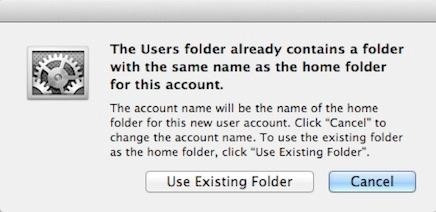
You are manually restoring the home folder for a new user account, and see the message shown above. What will happen if you click Cancel?
A. The existing home folder's name will be changed to match the one you entered in the new account sheet.
B. The account name will be changed to the name of the existing home folder.
C. You will be returned to the new account sheet in the Users and Group pane.
D. The existing home folder will be displayed in the Finder with the name selected.
Questions 7
In OS X Mountain Lion, which TWO types of file service hosts can you browse in the Network folder? (Select 2)
A. WebDAV
B. FTP
C. DFS
D. SMB
E. AFP
Questions 8
A FileVault 2-protected system can be unlocked using the recovery key that was generated during the FileVault 2 setup process. This key can be entered during system startup, and will allow you to reset the user's account password.
A. How can you select a new printer driver for a configured printer?
B. How can you unlock a FileVault 2-protected system when all user accounts have lost their passwords?
C. How can you ensure that previously deleted items are securely erased?
D. How can you prevent a user from installing software updates?
Questions 9
The master password is used to reset local account passwords.
A. How can you identify duplicate fonts?
B. Where are application preferences stored?
C. What are the advantages of code signing?
D. What does the master password do?
Questions 10
If a network device needs to send data to another network device on the same LAN, it addresses the outgoing packets based on the destination device's MAC address.
A. How does the IP use the MAC address to send messages between computers on a local area network (LAN)?
B. How do the four default System Preferences categories differ?
C. How does the keychain system help protect your information?
D. How can you verify that DNS host name resolution is working?
Questions 11
What security risk related to storage can occur when fast user switching is enabled?
A. When a user changes his own account password, the system will keep his login keychain password in sync.
B. When fast user switching is enabled, all users are allowed to see other users' locally connected disks.
C. The Archive option in the Finder creates compressed zip archive files.
D. The Finder hides traditional UNIX resources from average users because they don't need to have access to those items. If users need access to these UNIX items, they can access them from Terminal.
Questions 12
Each primary stage of system initialization can be indicated by the following: firmware, startup chime or bright flash of the power-on light, followed by a light gray screen on the primary display; booter, a dark gray Apple logo on the primary display; kernel, a small dark gray spinning gear or spinning earth icon below the Apple logo; and system launchd, a white screen on all displays followed by the login screen.
A. What are the primary system initialization stages in OS X? What are the visual and audible cues of these items?
B. What are some privacy and security concerns with the Spotlight service?
C. What are the advantages of code signing?
D. Why does the Finder hide certain folders at the root of the system volume?
Questions 13
Keychains can be managed from the /Applications/Utilities/Keychain Access application.
A. What two methods are used to hide items from the Finder?
B. What application is used to manage keychain settings?
C. What backup destination disks does Time Machine support?
D. What's used to identify a Wi-Fi network?


Home | About Us | Contact Us | FAQ | Guarantee Policy | Privacy Policy
Any charges made through this site will appear as Global Simulators Limited. All trademarks are the property of their respective owners.
Copyright © 2004-2026 pass2lead.com, All Rights Reserved.