

APPLE-DEVICE-SUPPORT Online Practice Questions and Answers
Questions 4
Where can you change the undo send delay setting on your iPad?
A. General > Mail > Undo Send Delay
B. Open your mail app then open settings and select Undo Send Delay.
C. Settings > Mail > Accounts > Undo Send Delay
D. Settings > Mail > Undo Send Delay
Questions 5
Select Three.
In MacOS on APFS volumes, when are FileVault encryption keys generated?
A. When a user is deleted
B. During the first login by a user on the Mac
C. When a user turns on FileVault
D. Setting the first user's password
E. During user creation
Questions 6
How many times will Face ID attempt to recognize your face before asking for your passcode?
A. Seven
B. Ten
C. Five
D. Three
Questions 7
What are Pencil Model 2 compatible with?
A. iPad Pro 11-inch (1st generation and later)
B. iPad Pro 12.9-inch (3rd generation and later)
C. Pad mini (6th generation)
D. iPad Air (4th generation and later)
Questions 8
Which macOS and iPadOS feature lets you use your iPad to extend or mirror the display on your Mac?
A. Universal Control
B. Screen Sharing
C. Sidecar
D. Stage Manager
Questions 9
You're ready to transfer a sysdiagnose from your iPad to your Mac.
Where in System Settings can you locate the log file on iPad?
A. Logging > Debug Logging
B. General > Analytics and Improvements > Analytics Data
C. Privacy and Security > Analytics and Improvements > Analytics Data
D. Analytics > Analytics Data
Questions 10
If you need to sync data from iCIoud to your Windows PC, what must you do?
A. Download iCIoud for Windows from the Microsoft Store.
B. Airdrop the files to your PC.
C. Download the files and send them to your PC manually.
D. Download iCIoud on your PC and manually start the transfer.
Questions 11
Use this image to answer the question.
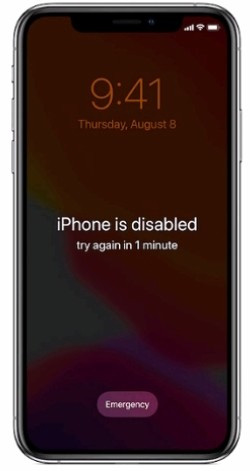
What should you do if you forgot your passcode and your iPhone is disabled?
A. Put your iPhone in recovery mode, then connect it to your Mac or PC to restore it.
B. Force shutdown your iPhone and wait 10 seconds, then turn it back on.
C. Wait until the Forgot Passcode? message appears, then follow the instructions.
D. Connect your iPhone to your Mac, then use Apple Configurator to revive the device.
Questions 12
Scenario
You're troubleshooting a third-party app that frequently quits on your Mac. You've determined that the issue occurs across all user accounts.
What should be your next step in troubleshooting the app's issue?
A. Create a new file.
B. Upgrade to the latest version of the app.
C. Remove the -/Library/Preferences/application name preference file.
D. Reinstall or upgrade macOS.
E. Troubleshoot application preferences.
Questions 13
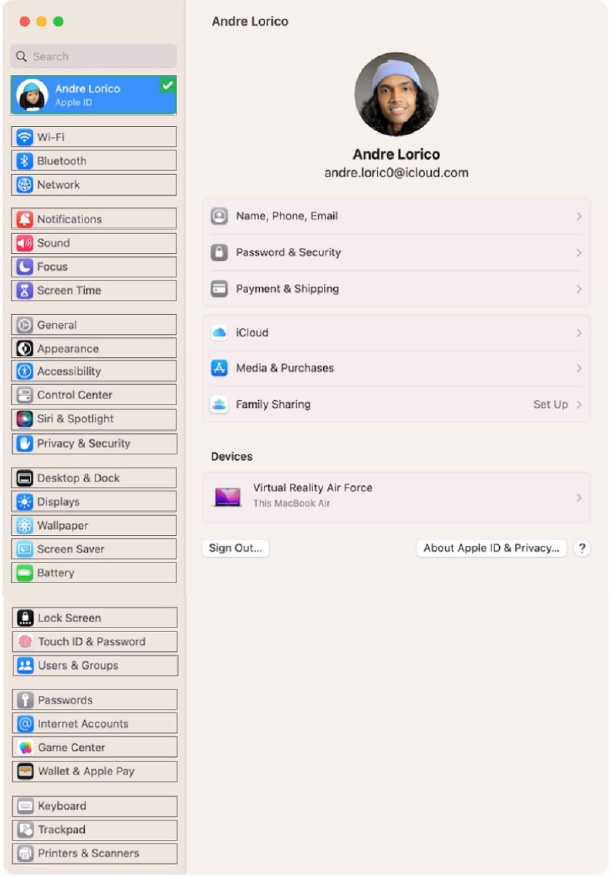
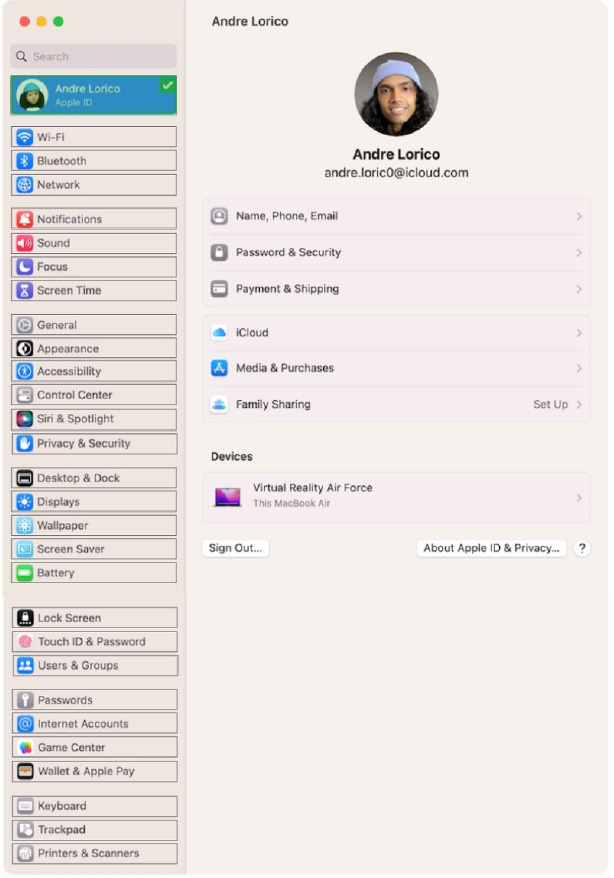
Select the setting in the sidebar that you should use to turn on Find My on your Mac.
Hot Area:


Home | About Us | Contact Us | FAQ | Guarantee Policy | Privacy Policy
Any charges made through this site will appear as Global Simulators Limited. All trademarks are the property of their respective owners.
Copyright © 2004-2026 pass2lead.com, All Rights Reserved.