

ARA-C01 Online Practice Questions and Answers
Questions 4
When using the Snowflake Connector for Kafka, what data formats are supported for the messages? (Choose two.)
A. CSV
B. XML
C. Avro
D. JSON
E. Parquet
Correct Answer: CD
Explanation: The data formats that are supported for the messages when using the Snowflake Connector for Kafka are Avro and JSON. These are the two formats that the connector can parse and convert into Snowflake table rows. The connector supports both schemaless and schematized JSON, as well as Avro with or without a schema registry1. The other options are incorrect because they are not supported data formats for the messages. CSV, XML, and Parquet are not formats that the connector can parse and convert into Snowflake table rows. If the messages are in these formats, the connector will load them as VARIANT data type and store them as raw strings in the table2. References: Snowflake Connector for Kafka | Snowflake Documentation, Loading Protobuf Data using the Snowflake Connector for Kafka | Snowflake Documentation
Questions 5
Which of the following are characteristics of how row access policies can be applied to external tables? (Choose three.)
A. An external table can be created with a row access policy, and the policy can be applied to the VALUE column.
B. A row access policy can be applied to the VALUE column of an existing external table.
C. A row access policy cannot be directly added to a virtual column of an external table.
D. External tables are supported as mapping tables in a row access policy.
E. While cloning a database, both the row access policy and the external table will be cloned.
F. A row access policy cannot be applied to a view created on top of an external table.
Correct Answer: ABC
Explanation: These three statements are true according to the Snowflake documentation and the web search results. A row access policy is a feature that allows filtering rows based on user-defined conditions. A row access policy can be applied to an external table, which is a table that reads data from external files in a stage. However, there are some limitations and considerations for using row access policies with external tables. An external table can be created with a row access policy by using the WITH ROW ACCESS POLICY clause in the CREATE EXTERNAL TABLE statement. The policy can be applied to the VALUE column, which is the column that contains the raw data from the external files in a VARIANT data type1. A row access policy can also be applied to the VALUE column of an existing external table by using the ALTER TABLE statement with the SET ROW ACCESS POLICY clause2. A row access policy cannot be directly added to a virtual column of an external table. A virtual column is a column that is derived from the VALUE column using an expression. To apply a row access policy to a virtual column, the policy must be applied to the VALUE column and the expression must be repeated in the policy definition3. External tables are not supported as mapping tables in a row access policy. A mapping table is a table that is used to determine the access rights of users or roles based on some criteria. Snowflake does not support using an external table as a mapping table because it may cause performance issues or errors4. While cloning a database, Snowflake clones the row access policy, but not the external table. Therefore, the policy in the cloned database refers to a table that is not present in the cloned database. To avoid this issue, the external table must be manually cloned or recreated in the cloned database4. A row access policy can be applied to a view created on top of an external table. The policy can be applied to the view itself or to the underlying external table. However, if the policy is applied to the view, the view must be a secure view, which is a view that hides the underlying data and the view definition from unauthorized users5. References: CREATE EXTERNAL TABLE | Snowflake Documentation ALTER EXTERNAL TABLE | Snowflake Documentation Understanding Row Access Policies | Snowflake Documentation Snowflake Data Governance: Row Access Policy Overview Secure Views | Snowflake Documentation
Questions 6
A table contains five columns and it has millions of records. The cardinality distribution of the columns is shown below:
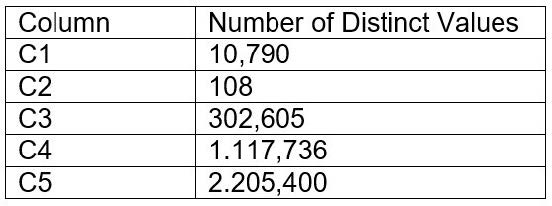
Column C4 and C5 are mostly used by SELECT queries in the GROUP BY and ORDER BY clauses. Whereas columns C1, C2 and C3 are heavily used in filter and join conditions of SELECT queries.
The Architect must design a clustering key for this table to improve the query performance.
Based on Snowflake recommendations, how should the clustering key columns be ordered while defining the multi-column clustering key?
A. C5, C4, C2
B. C3, C4, C5
C. C1, C3, C2
D. C2, C1, C3
Correct Answer: C
Explanation: According to the Snowflake documentation, the following are some considerations for choosing clustering for a table1:
Clustering is optimal when either:
Clustering is most effective when the clustering key is used in the following types of query predicates:
Clustering is less effective when the clustering key is not used in any of the above query predicates, or when the clustering key is used in a predicate that requires a function or expression to be applied to the key (e.g. DATE_TRUNC,
TO_CHAR, etc.).
For most tables, Snowflake recommends a maximum of 3 or 4 columns (or expressions) per key. Adding more than 3-4 columns tends to increase costs more than benefits.
Based on these considerations, the best option for the clustering key columns is C. C1, C3, C2, because:
These columns are heavily used in filter and join conditions of SELECT queries, which are the most effective types of predicates for clustering. These columns have high cardinality, which means they have many distinct values and can help
reduce the clustering skew and improve the compression ratio. These columns are likely to be correlated with each other, which means they can help co-locate similar rows in the same micro-partitions and improve the scan efficiency.
These columns do not require any functions or expressions to be applied to them, which means they can be directly used in the predicates without affecting the clustering.
References: 1: Considerations for Choosing Clustering for a Table | Snowflake Documentation
Questions 7
When loading data from stage using COPY INTO, what options can you specify for the ON_ERROR clause? (Choose three.)
A. CONTINUE
B. SKIP_FILE
C. ABORT_STATEMENT
D. FAIL
Correct Answer: ABC
The ON_ERROR clause is an optional parameter for the COPY INTO command that specifies the behavior of the command when it encounters errors in the files. The ON_ERROR clause can have one of the following values1:
Therefore, options A, B, and C are correct.
References: : COPY INTO

