

AZ-801 Online Practice Questions and Answers
Questions 4
HOTSPOT
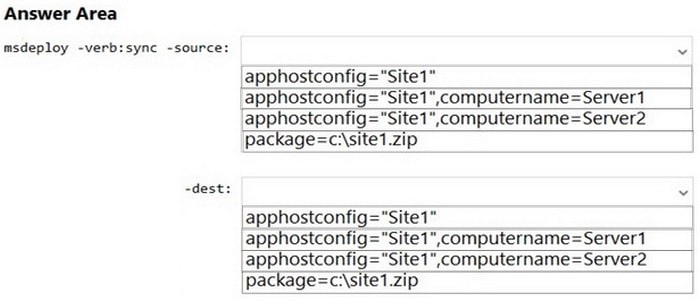
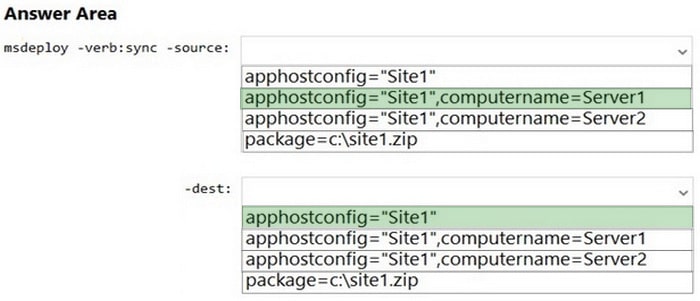
You have two servers that have the Web Server (IIS) server role installed. The servers are configured as shown in the following table.

Both servers are configured to enable website deployment by using the Web Deployment Tool. Server1 hosts a website named Site1 that has Web Deploy Publishing configured.
You plan to migrate Site1 to Server2.
You need to perform a pull synchronization of Site1 by using the Web Deployment Agent Service.
How should you complete the command? To answer, select the appropriate options in the answer area.
NOTE: Each correct selection is worth one point.
Hot Area:
Questions 5
HOTSPOT
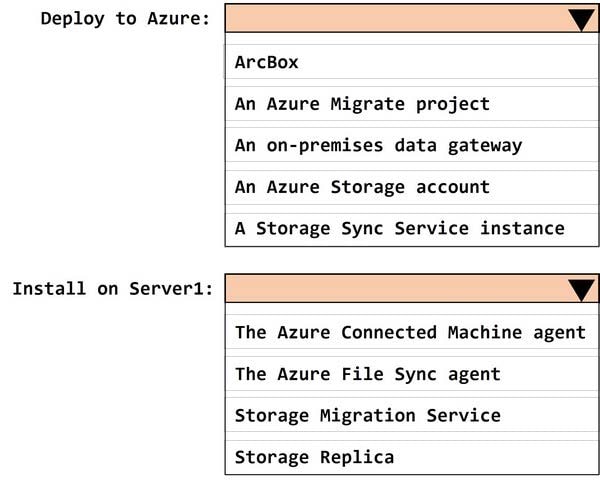
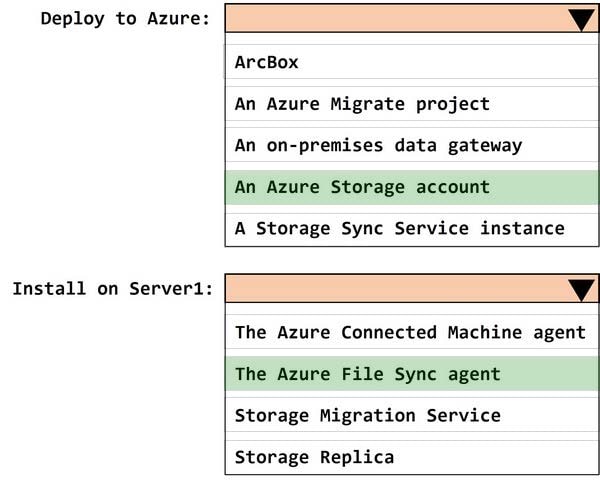
You have an on-premises server that runs Windows Server and contains a folder named Folder1. Folder1 contains 50 GB of files.
You have an Azure subscription that contains an Azure Files share named share1.
You need to migrate the data in Folder1 to share1.
What should you do? To answer, select the appropriate options in the answer area. NOTE: Each correct selection is worth one point.
Hot Area:
Questions 6
HOTSPOT
You have an on-premises server named Server1 that runs Windows Server.
You have an Azure subscription.
You plan to back up the files and folders on Server1 by using the Microsoft Azure Recovery Services (MARS) agent.
You need to identify to which location the backups can be written and the maximum number of scheduled backups that can be performed per day.
What should you identify? To answer, select the appropriate options in the answer area.
NOTE: Each correct selection is worth one point
Hot Area:


Questions 7
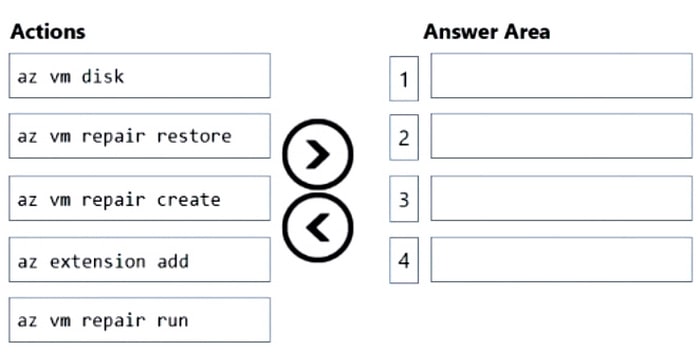
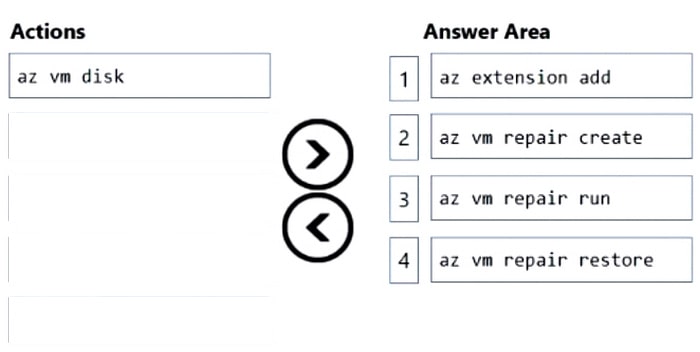
DRAG DROP
You have an Azure virtual machine named VM1 that runs Windows Server.
The operating system on VM1 fails to start due to a disk error.
You need to resolve the error.
Which four commands should you run in sequence in Azure Cloud Shell? To answer, move the appropriate commands from the list of commands to the answer area and arrange them in the correct order.
Select and Place:
Questions 8
You are planning the migration of Archive1 to support the on-premises migration plan.
What is the minimum number of IP addresses required for the node and cluster roles on Cluster3?
A. 2
B. 3
C. 4
D. 5
Questions 9
Note: This question is part of a series of questions that present the same scenario. Each question in the series contains a unique solution that might meet the stated goals. Some question sets might have more than one correct solution, while
others might not have a correct solution.
After you answer a question in this section, you will NOT be able to return to it. As a result, these questions will not appear in the review screen.
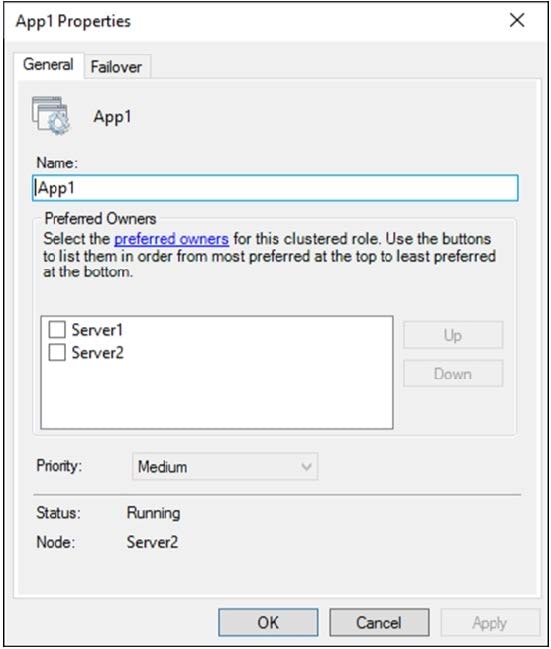
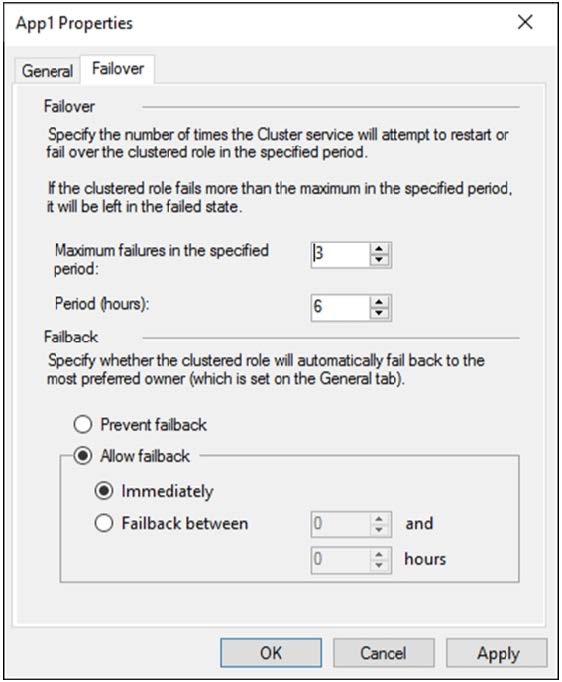
You have a failover cluster named Cluster1 that hosts an application named App1.
The General tab in App1 Properties is shown in the General exhibit. (Click the General tab.)
The Failover tab in App1 Properties is shown in the Failover exhibit. (Click the Failover tab.)
Server1 shuts down unexpectedly.
You need to ensure that when you start Server1, App1 continues to run on Server2.
Solution: From the Failover settings, you select Prevent failback.
Does this meet the goal?
A. Yes
B. No
Questions 10
You have three servers named Server 1. Servers and Server3 that run Windows Server. The servers have the Hyper-V server rote installed and are configured in a Storage Spaces Deed cluster named Cluster1.
Cluster1 hosts a virtual machine named VM1 that has Windows Admin Center Installed.
You manage all servers and clusters by using Windows Admin Center.
You purchase an Azure subscription.
You need to configure email alerts in Azure Monitor for the following:
1.
Disk Capacity Utilization Over 80% for 10 Minutes
2.
Any critical alert in the cluster system event log
3.
Memory Utilization over 95% for 10 minutes
4.
Heartbeat fewer than 5 beats for 5 Minutes.
5.
CPU Utilization over 85 % for 10 Minutes.
6.
Any hearth service faults for the cluster
The solution must use the minimum amount of administrative effort.
What should you do?
A. From Windows Admin Center, configure Azure Monitor and onboard Cluster1
B. From Azure portal, configure Azure Monitor and onboard Cluster1 by using Azure Arc.
C. Configure Azure Monitor and manually install the Microsoft Monitoring Agent on Server1, Server2 and Server3
Questions 11
You have an on-premises network and an Azure virtual network.
You establish a Site-to-Site VPN connection from the on-premises network to the Azure virtual network, but the connection frequently disconnects.
You need to debug the IPsec tunnel from Azure.
Which Azure VPN Gateway diagnostic log should you review?
A. GatewayDiagnosticLog
B. RouteDiagnosticLog
C. IKEDiagnosticLog
D. TunnelDiagnosticLog
Questions 12
You have an Azure virtual machine named VM1. Crash dumps for a process named Process1 are enabled for VM1.
When process1.exe on VM1 crashes, a technician must access the memory dump files on the virtual machine.
The technician must be prevented from accessing the virtual machine.
To what should you provide the technician access?
A. an Azure file share
B. an Azure Log Analytics workspace
C. an Azure Blob Storage container
D. a managed disk
Questions 13
You have two Azure virtual networks named Vnet1 and Vnet2.
You have a Windows 10 device named Client1 that connects to Vnet1 by using a Point-to-Site (P2S) IKEv2 VPN.
You implement virtual network peering between Vnet1 and Vnet2. Vnet1 allows gateway transit Vnet2 can use the remote gateway.
You discover that Client1 cannot communicate with Vnet2.
You need to ensure that Client1 can communicate with Vnet2.
Solution: You resize the gateway of Vnet1 to a larger SKU.
Does this meet the goal?
A. Yes
B. No


Home | About Us | Contact Us | FAQ | Guarantee Policy | Privacy Policy
Any charges made through this site will appear as Global Simulators Limited. All trademarks are the property of their respective owners.
Copyright © 2004-2026 pass2lead.com, All Rights Reserved.