

C2090-620 Online Practice Questions and Answers
Questions 4
In Report Studio, an author creates a list report containing columns for Staf Name, Order number, and Revenue. The author wants to burst this report to various sales staf members. Each member should see only data relatng to sales they have made. What must the author do to specify that the burst report output will contain only data for the appropriate sales staf member?
A. In the report layout, create a master-detail relatonship on the Staf Name data item.
B. In the report layout, add the Staf Name data item as a property of the List object.
C. In the burst optons for the report, use the Staf Name data item to specify the Burst Recipients.
D. In the burst optons for the report, use the Staf Name data item to specify the Burst Groups.
Questions 5
In Report Studio, when would the author need to unlock cells on a report?
A. To merge two report types into a single report.
B. To merge query items into a single column.
C. To merge a query item into a text item.
D. To merge report objects in table.
Questions 6
In Report Studio, what must an author create to let users view a report as either a list, a crosstab, or a chart?
A. A string variable
B. A Boolean variable
C. A query calculaton
D. A layout calculaton
Questions 7
In the image below,
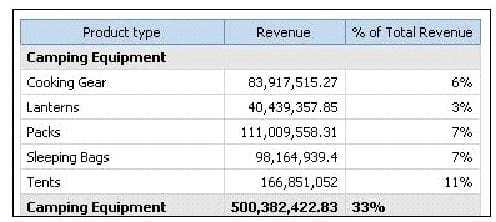
the last column calculates the percentage that each Product type contributed to the overall revenue. What is the calculaton in the last column?
A. percentage ([Revenue])
B. percentage ([Revenue] for Product type)
C. percentage ([Product type] for [Revenue])
D. percentage ([Product type])
Questions 8
In the report shown,

users click on the Product line link to navigate to the specifc product line in the list below. Users can also click on the Top link to return to the Product line list at the top of the report. Bookmarks are used to control this drill-through behavior. How is each of the drill-throughs defned for this report to functon as described?
A. Product line drill-through: bookmark source type = Text, where Text =Top;Top drill-through: bookmark source type = Data Item Value, where Data Item = Product line
B. Product line drill-through: bookmark source type = Data Item Label, where Data Item = Product line;Top drill-through: bookmark source type = Text, where Text =Top
C. Product line drill-through: bookmark source type = Data Item Value, where Data Item = Product line;Top drill-through: bookmark source type = Text, where Text =Top
D. Product line drill-through: bookmark source type = Text, where Text = Top;Top drill-through: bookmark source type = Data Item Value, where Data Item = Product line
Questions 9
In the report shown in the image,
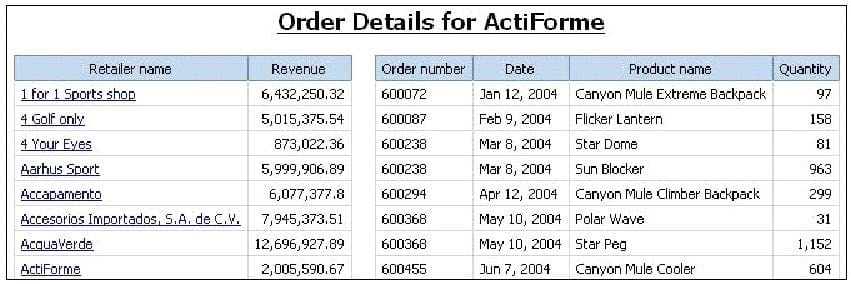
users click on the Retailer name in the lef and see the related data on the right. What is the technique used to create this report?
A. Master-detail relatonship where the master and the detail is in a separate list
B. Drill-through defniton where one column in a list drills through to a separate list in the same report
C. Master-detail relatonship where the master and the detail is in the same list
D. Drill-through defniton where one column in a list drills through to the same list in the same report
Questions 10
In Event Studio, which of the following tasks are available to a report author?
A. Run an agent
B. Run an export
C. Run an import
D. Run an index update
Questions 11
In Event Studio, which defniton best describes the event key?
A. The object that is created in Event Studio.
B. Specifc occurrence of data items that an agent must detect.
C. One or more data items that uniquely defne an event instance.
D. The set of detected event instances that satsfy the task executon rules.
Questions 12
In Report Studio, why would an author create Statc Choices for a prompt?
A. To provide prompt optons that are not found in the data source.
B. So that the prompt appears with an opton selected by default.
C. To provide default values to satsfy a parameter so a prompt page will not appear.
D. So that the items that appear in the prompt depend on items selected in another prompt.
Questions 13
The sales department requires a report that numerically compares the gross proft generated for all product lines in each territory. In Report Studio, which is the most appropriate report type?
A. List
B. Chart
C. Crosstab
D. Map report


Home | About Us | Contact Us | FAQ | Guarantee Policy | Privacy Policy
Any charges made through this site will appear as Global Simulators Limited. All trademarks are the property of their respective owners.
Copyright © 2004-2026 pass2lead.com, All Rights Reserved.