

HPE0-S50 Online Practice Questions and Answers
Questions 4
HOTSPOT
A customer has the following HPE Synergy solution:
Three Synergy frames
Two HPE Virtual Connect SE 16Gb Fibre Channel (FC) modules in each frame.
Two HPE Virtual Connect SE 40Gb F8 modules
Four HPE Synergy 10Gb Interconnect Link Modules
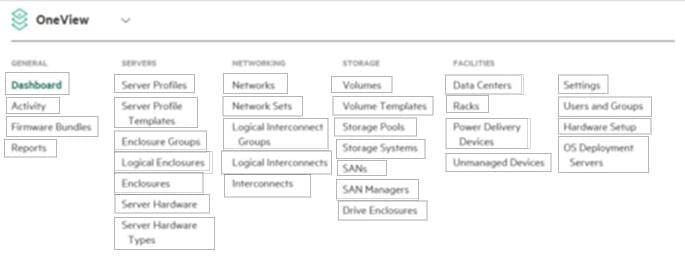
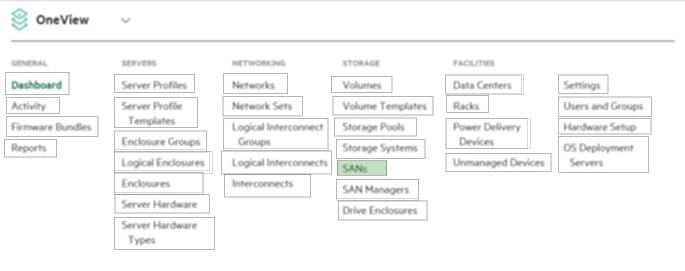
Click the menu option the Synergy integrator should use to add more uplinks from HPE Virtual Connect SE 16Gb FC modules to SAN switches.
Hot Area:
Questions 5
DRAG DROP
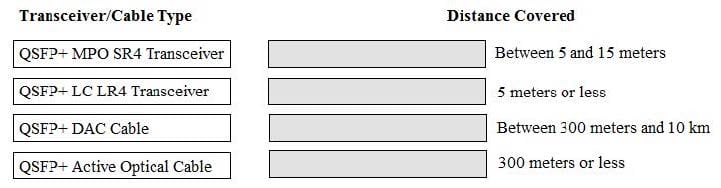
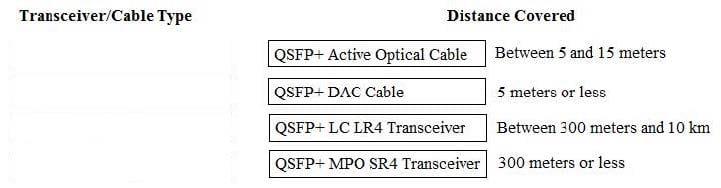
A customer needs a Synergy solution configuration with 40Gb uplinks that will connect to network equipment in a different rack.
Click and drag the cable type on the left to the corresponding distance between the frame and the network equipment on the right to meet the customer's needs.
Select and Place:
Questions 6
How can a Synergy integrator increase the efficiency with which a Synergy solution can be provisioned? (Choose two.)
A. Use Powershell to automate configuration and application of server profiles.
B. Use Image Streamer to provide a stateless OS environment.
C. Associate all Synergy frames with the same data center.
D. Use a Multimodule Link Aggregation Group (MLAG) to automate link failover.
E. Use Composer as a PXE server to automate OS deployments.
Questions 7
A customer needs to attach 20 HPE 1TB 6G SAS SFF hard drives to an HPE Synergy 480 Gen9 compute module. The customer needs a fully redundant storage solution.
Which HPE products meet the customer's needs? (Choose three.)
A. HPE D3940 storage module with HPE Synergy D3940 Redundant I/O Adapter.
B. HPE D3940 storage module with Single I/O Adapter.
C. two HPE Synergy 12Gb SAS Connection Modules
D. two HPE Smart Array P542D Controllers
E. one HPE Smart Array P542D Controller
F. one HPE Synergy 12Gb SAS Connection Module
Questions 8
A Synergy integrator has planned a highly available Synergy composable fabric with 20Gb Interconnect Link Modules. What is the maximum number of SY 480 Gen9 compute modules the integrator can install into this configuration?
A. 12
B. 24
C. 36
D. 48
Questions 9
Refer to the exhibits.
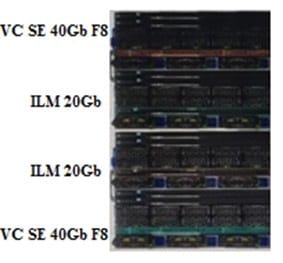
A customer has a Synergy 2-frame design, as shown above.
Due to expanding business needs, the customer has ordered a third frame to expand the environment to a 3-frame fabric design, as shown below.
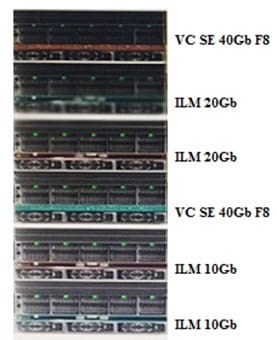
While attempting to extend the Logical Interconnect Group (LIG) for the enclosure group, the Synergy integrator is unable to add the third frame. What is preventing the integrator from adding the third frame?
A. The Virtual Connect SE 40Gb F8 modules are installed in the incorrect location.
B. The incorrect interconnect Link modules have been installed.
C. The Frame Link Module firmware has not been updated in the new frame.
D. The HPE OneView software on the Composer has not been updates to the latest version.
Questions 10
Refer to the exhibit.
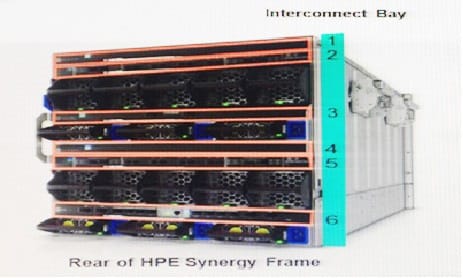
How should a Synergy integrator pair interconnect bays to set up redundant fabrics in an HPE Synergy 12000 Frame?
A. Interconnect bays 1 and 2; bays 3 and 4; bays 5 and 6.
B. Interconnect bays 1 and 4; bays 2 and 5; bays 3 and 6.
C. Interconnect bays 1 and 6; bays 2 and 5; bays 3 and 4.
D. Interconnect bays 1 and 3; bays 2 and 4; bays 5 and 6.
Questions 11
Which element of the HPE Synergy 12000 Frame protects against loops on the MGMT ports that are connected to the external management network?
A. Image Streamer
B. Frame Link Modules
C. Interconnect Modules
D. Composer
Questions 12
A customer has the following configuration:
15 Synergy Frames with 150 HPE SY 480 Gen9 compute modules
15 HPE Synergy D3940 storage modules with 40 disks each
10 Image Streamers
10 HPE Synergy Virtual Connect SE 40Gb F8 modules
20 20Gb Interconnect Link Modules
During setup, how many enclosures should the Synergy integrator select for the Logical Interconnect Group ((LIG)?
A. 5 enclosures
B. 10 enclosures
C. 15 enclosures
D. 20 enclosures
Questions 13
A customer is planning an HPE Synergy solution with 20 frames and needs to minimize the number of management ports that are required to connect the frames into the existing management network.
Which procedure should the Synergy integrator use to address the customer's concern?
A. Connect FLMs from all frames into a management ring. Then connect the management ring to the customer's management network using two uplinks.
B. Connect FLMs from all frames to two external switches for redundancy. Then connect the two uplinks from the two switches into the customer's management network.
C. Connect the RJ-45 front ports of each frame to two external switches for redundancy. Then connect the uplink from the two switches into the customer's management network.
D. Connect the RJ-45 front ports of each frame to an external switch. Then connect the uplink from the external switch into the customer's management network.


Home | About Us | Contact Us | FAQ | Guarantee Policy | Privacy Policy
Any charges made through this site will appear as Global Simulators Limited. All trademarks are the property of their respective owners.
Copyright © 2004-2026 pass2lead.com, All Rights Reserved.