

HPE6-A77 Online Practice Questions and Answers
Questions 4
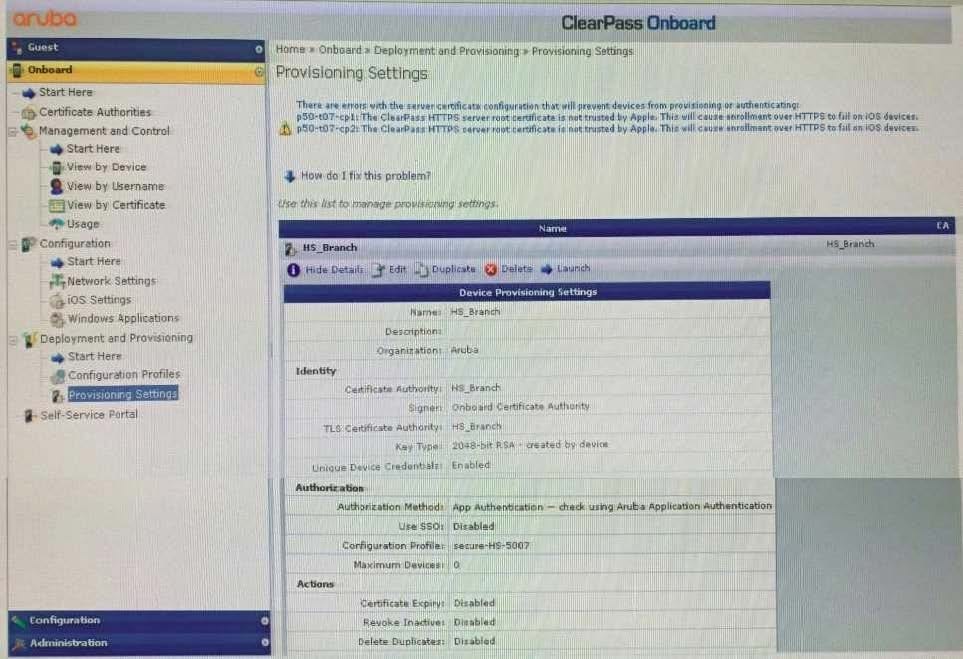
Refer to the exhibit:
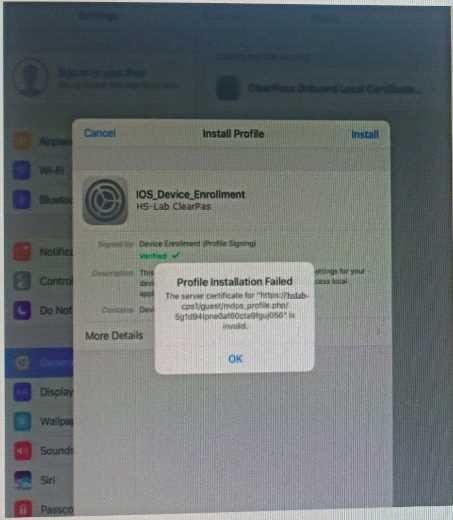
A customer has configured Onboard and Windows devices work as expected but cannot get the Apple iOS devices to Onboard successfully. Where would you look to troubleshoot the Issued (Select two)
A. Check if the ClearPass HTTPS server certificate installed in the server is issued by a trusted commercial certificate authority.
B. Check if the customer installed the internal PKl Root certificate presented by the ClearPass during the provisioning process.
C. Check if a DNS entry is available for the ClearPass hostname in the certificate, resolvable from the DNS server assigned to the client.
D. Check if the customer has Instated a custom HTTPS certificate for IDS and another internal PKl HTTPS certificate for other devices.
E. Check if the customer has installed the same internal PKl signed RADIUS server certificate as the HTTPS server certificate.
Questions 5
Refer to the Exhibit:
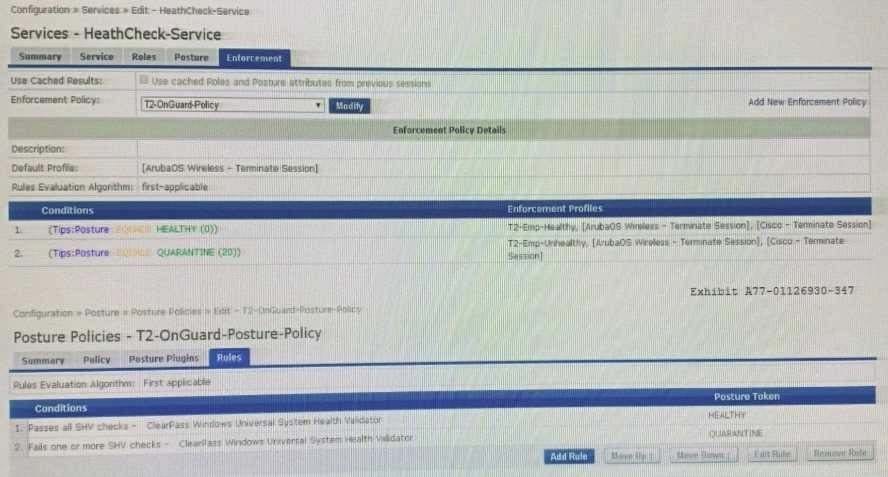
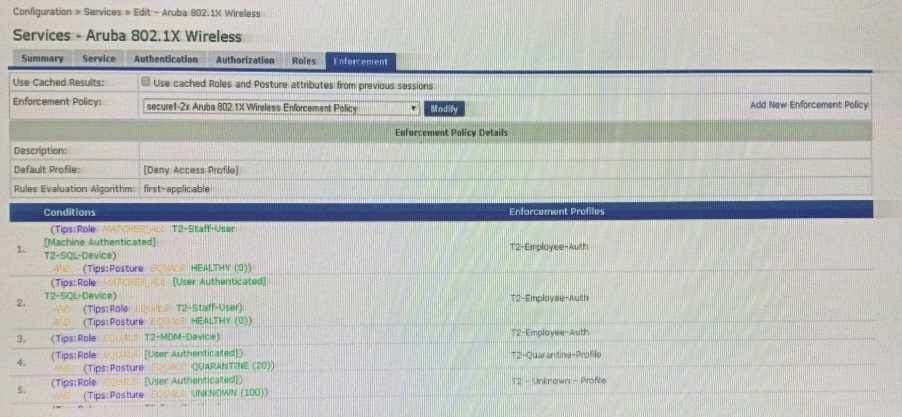
A customer wants to integrate posture validation into an Aruba Wireless 802.1X authentication service
During testing, the client connects to the Aruba Employee Secure SSID and is redirected to the Captive Portal page where the user can download the OnGuard Agent After the Agent is installed, the client receives the Healthy token the client remains connected to the Captive Portal page ClearPass is assigning the endpoint the following roles: T2-Staff-User. (Machine Authenticated! and T2-SOL-Device. What could cause this behavior?
A. The Enforcement Policy conditions for rule 1 are not configured correctly.
B. Used Cached Results: has not been enabled In the Aruba 802.1X Wireless Service
C. RFC-3576 Is not configured correctly on the Aruba Controller and does not update the role.
D. The Enforcement Profile should bounce the connection instead of a Terminate session
Questions 6
Refer to the exhibit:
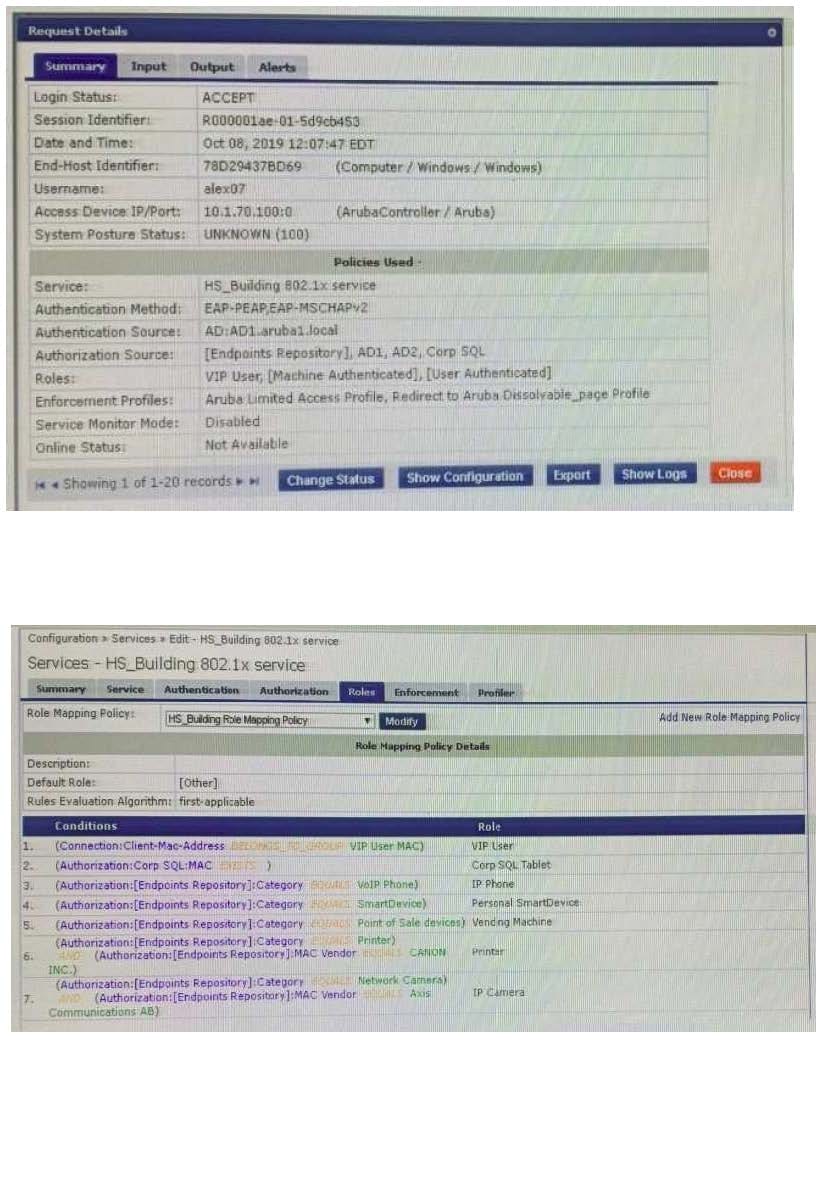
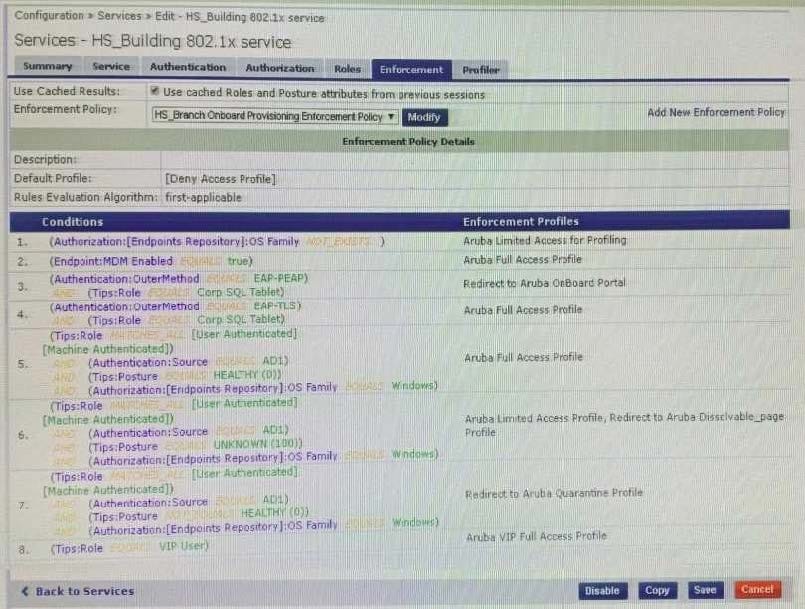
The customer created a new enforcement policy condition to allow VIP Users access without additional security compliance checks hut cannot gel it working. The customer has sent you the above screenshots. How would you resolve the issue?
A. Ask the VIP user to complete the one time web health check to get the VIP profile.
B. Set the Enforcement Policy rules evaluation algorithm to evaluate all.
C. Include VIP User role along with the Healthy posture enforcement condition.
D. Modify the Enforcement Policy and re-order the VIP user condition to the lop.
Questions 7
You have integrated ClearPass Onboard with Active Directory Certificate Services (ADCS) web enrollment
to sign the final device TLS certificates. The customer would also like to use ADCS for centralized
management of TLS certificates including expiration, revocation, and deletion through ADCS.
What steps will you follow to complete the requirement?
A. Remove the EAP-TLS authentication method and add "EAP-TLS with OCSP Enabled' authentication method in the OnBoard Provisioning service. No other configuration changes are required.
B. Copy the [EAP-TLS with OSCP Enabled) authentication method and set the correct ADCS server OCSP URL, remove EAP-TLS and map the custom created method to the Onboard Provisioning Service.
C. Copy the default [EAP-TLS with OSCP Enabled] authentication method and update the correct ADCS server OCSP URL. remove EAP-TLS and map the custom created method to the OnBoard Authorization Service.
D. Edit the [EAP-TLS with OSCP Enabled) authentication method and set the correct ADCS server OCSP URL. remove EAP-TLS and map the [EAP-TLS with OSCP Enabled) method to the Onboard Provisioning Service.
Questions 8
Refer to the exhibit:
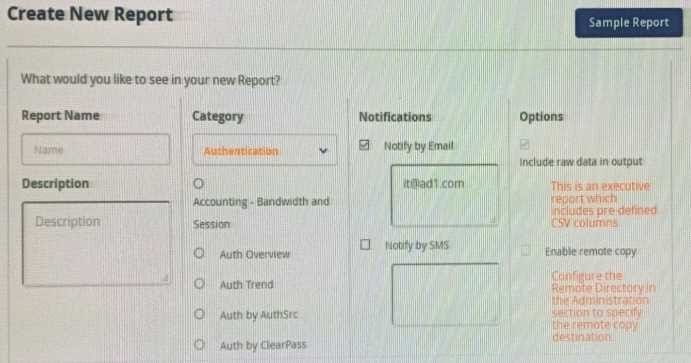
When creating a new report, there is an option to send report Notifications by Email. Where is the email server configured?
A. In the ClearPass Policy Manager Endpoint Context servers under Administration.
B. In the Insight Reports Interface under Administration on the sidebar menu.
C. In the insight report on the next screen of the report definition.
D. In the ClearPass Policy Manager Messaging setup under Administration.
Questions 9
Refer to the exhibit:
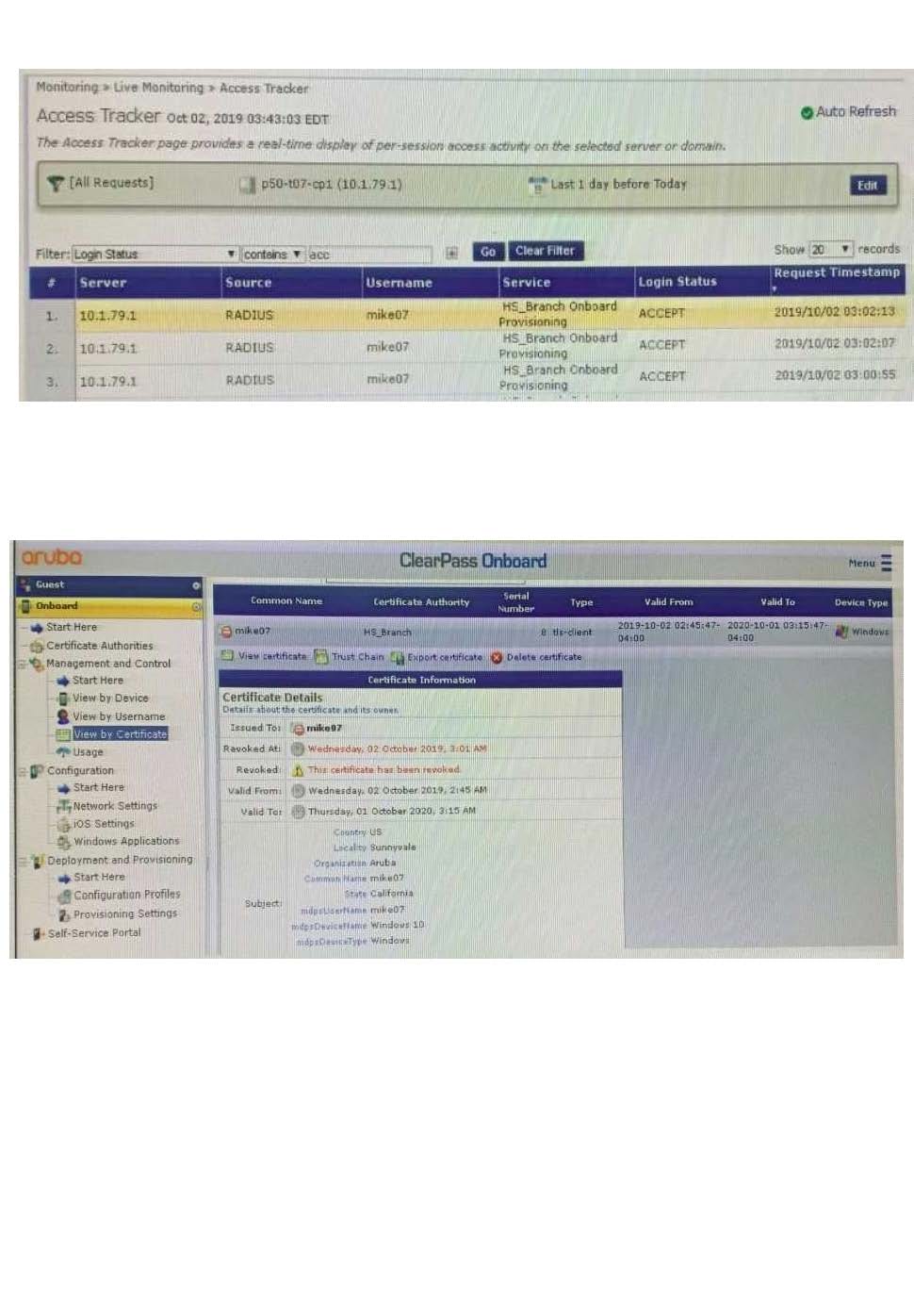
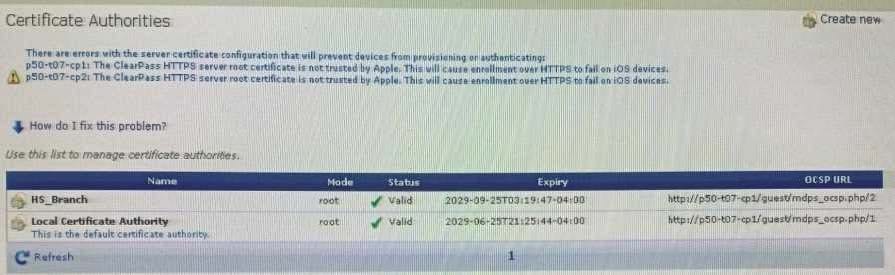
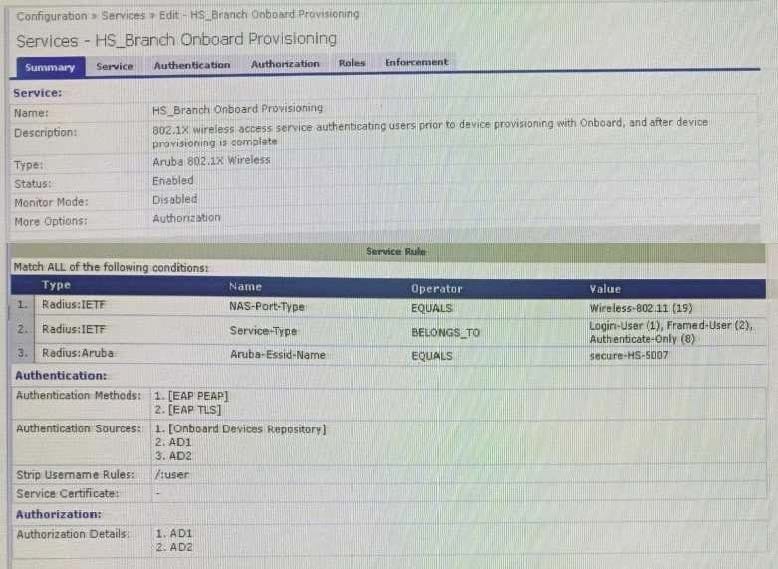
After the helpdesk revoked the certificate of a device reported to be lost oy an employee, the lost device
was seen as connected successfully to the secure network. Further testing has shown that device
revocation is not working.
What steps should you follow to make device revocations work?
A. Copy the default [EAP-TLS with OSCP Enabled] authentication method and set The Verify certificate using OSCP option as required then update the correct OSCP URL link of the OnBoard CA. Remove EAP-TLS and map the custom created method to the OnBoard Authorization Service.
B. copy the default [EAP-TLS with OSCP Enabled] authentication method and set the verify certificate using OSCP: option as "required" then configure the correct OSCF URL link for the OnBoard CA. Remove EAP-TLS and map the new [EAP-TLS with OSCP Enabled] method to the 802 1X Radius Service.
C. Remove the EAP-TLS authentication method configuration changes are required and add "EAP-TLS with OCSP Enabled" authentication method in the OnBoard Provisioning service. No other configuration changes are required.
D. Edit the default [EAP-TLS with OSCP Enabled] authentication method and set the Verify certificate using OSCP option as required then update the correct OSCP URL link of the OnBoard CA Remove EAP-TLS and map the new [EAP-TLS with OSCP Enabled] method to the OnBoard Provisioning Service.
Questions 10
A customer has acquired another company that has its own Active Directory infrastructure The 802 1X authentication works with the customers original Active Directory servers but the customer would like to authenticate users from the acquired company as well. What steps are required, in regards to the Authentication Sources, in order to support this request? (Select two.)
A. Create a new Authentication Source, type Active Directory.
B. Join the ClearPass server(s) to the new AD domain.
C. Add the new AD server(s) as backup into the existing Authentication Source.
D. There is no need to Join ClearPass to the new AD domain.
E. Create a new Authentication Source, type Generic LDAP.
Questions 11
A customer is looking to implement a Web-Based Health Check solution with the following requirements:
for the HR user's client devices, check if a USB stick is mounted.
for the RandD user's client devices, check if the hard disk is fully encrypted.
The Web-Based Health Check service has been configured but the customer it is not sure how to design
the Profile Policy.
How can be accomplished this customer request?
A. create two Posture Policies and customize the OnGuard Agent (Persistent or Dissolvable) to select the correct SHV checks
B. create one Posture Policy and define Rules Conditions that will apply different Tokens for each SHV check condition
C. create two Posture Policies and use the Restrict by Roles option to filter for HR and RandD user roles and apply the correct SHV checks
D. create one Posture Policy to check the HR users client devices and use the NAP Agent to check RandD users client devices
Questions 12
Refer to the exhibit:
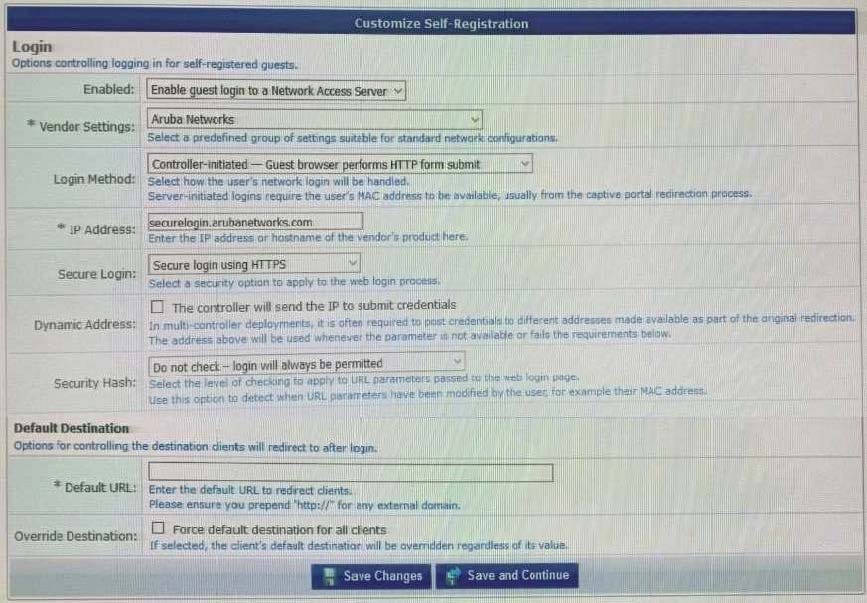
A customer with multiple Aruba Controllers has just installed a new certificate for "*.customerdomain com" on all Aruba Controllers. While testing the existing guest Self-Registration page the customer noticed that the logins are failing. While troubleshooting they are finding no entries in the Event Viewer or Access Tracker for the tests. Suspecting that the Aruba Controllers may not be properly posting the credentials from the guest browser, they open the NAS Vendor Settings for the Guest Self-Registration Page. From the screen shown, how can you fix the errors?
A. Change the "IP Address: field to" securelogin.customerdomain.com.
B. Change the "Secure Login:" field to "Use Vendor Default".
C. Change the "IP Address field to "captiveportal-login.customerdomain.com".
D. Add PTR records on the DNS server for "securelogin.arubanetworks.com".
Questions 13
Refer to the exhibit:
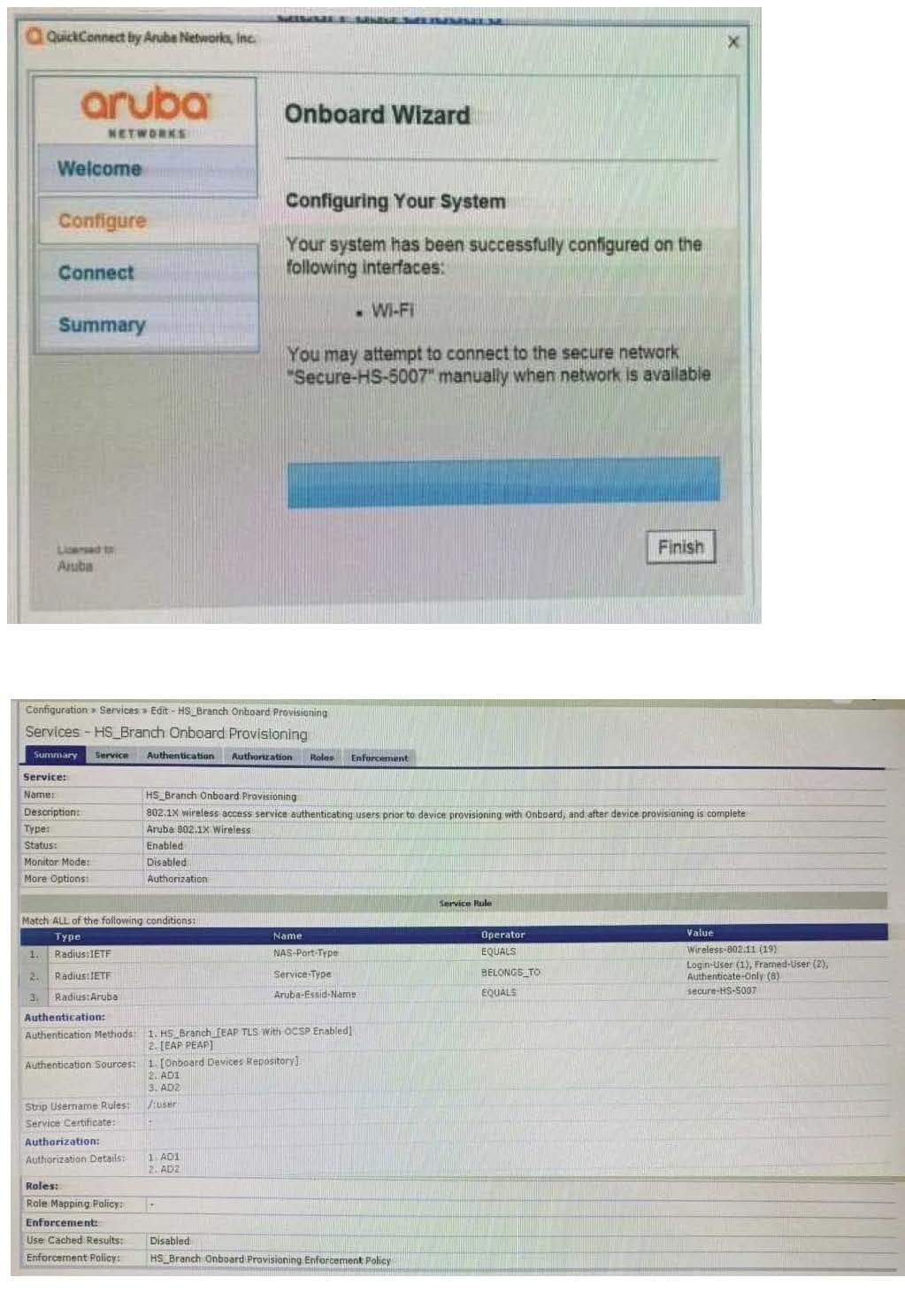
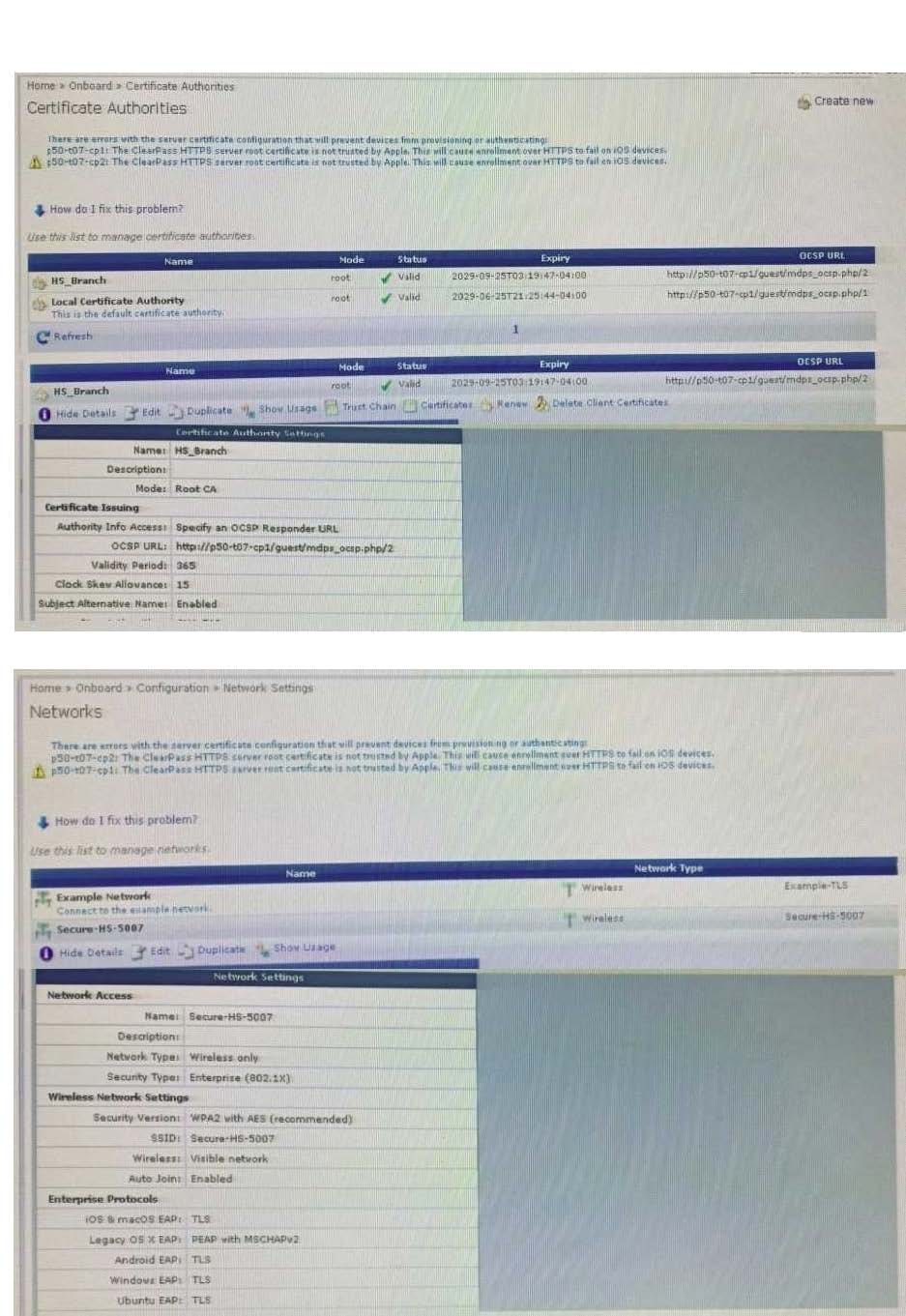
You have configured an Onboard portal for single SSID provision. During testing you notice that the QuickConnect Application did not display the "Connect" button, only the finish button. To get connected the test user had to manually connect to the secure-HS-5007 SSID but was prompted for a username and password. Using the screenshots as a reference, how would you fix this issue?
A. Check the network settings for the correct SSID name spelling.
B. Change the network settings to use EAP-TLS for the authentication protocol.
C. Install a public signed HTTPs web server certificate on the ClearPass server.
D. Configure the SSID to support both EAP-PEAP and EAP-TLS authentication method.


Home | About Us | Contact Us | FAQ | Guarantee Policy | Privacy Policy
Any charges made through this site will appear as Global Simulators Limited. All trademarks are the property of their respective owners.
Copyright © 2004-2026 pass2lead.com, All Rights Reserved.