

MB-240 Online Practice Questions and Answers
Questions 4
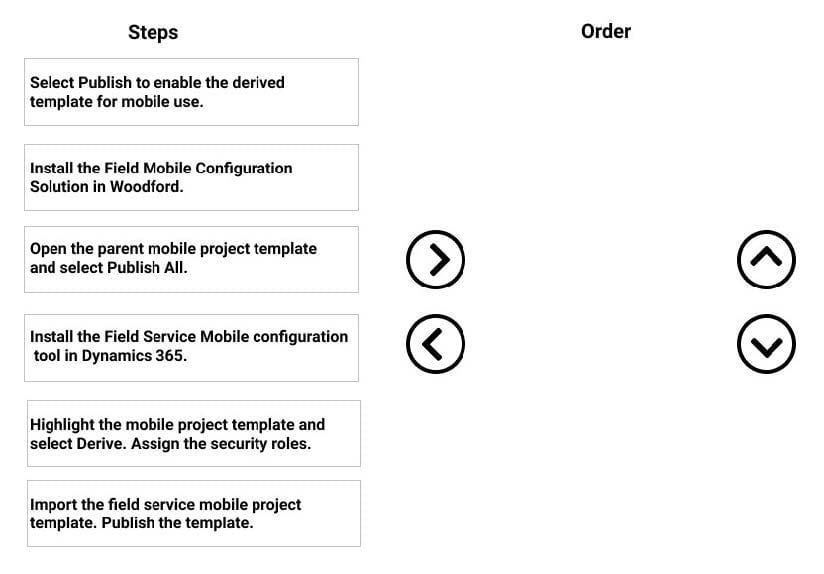
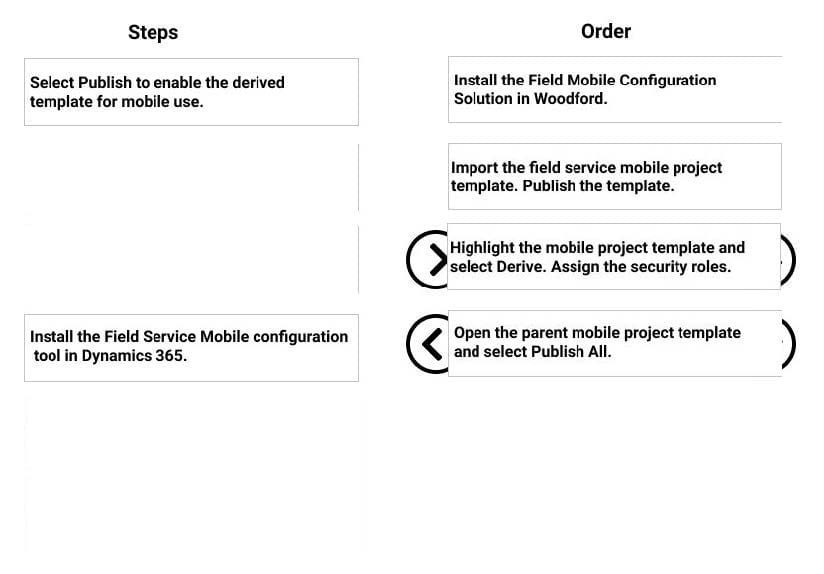
DRAG DROP
Your organization wants to use the Field Service Mobile App for technicians in the field.
You need to install the solution, so it can be configured for mobile technicians.
What are the four steps you need to perform, in sequence, to ensure the mobile solution is ready for configuration and deployment? To answer, move the appropriate actions from the list of actions to the answer area and arrange them in the
correct order.
Select and Place:
Questions 5
You are working for a heating, ventilation, and air conditioning (HVAC) service organization.
The field technicians in your organization are working in the Microsoft Dynamics 365 Field Service mobile app. The technicians report that they are able to access customer assets, but unable to access functional location and customer asset
hierarchy in offline mode.
You need to ensure technicians can view the functional location and customer asset hierarchy in their mobile app.
What should you do?
A. Ensure there is internet connectivity in the mobile app.
B. Add the technicians to the mobile app's offline profile.
C. Enable asset hierarchy for the mobile app.
D. Download offline data to the mobile app.
Questions 6
You are implementing a Microsoft Dynamics 365 Field Service solution for a client.
The client needs to be able to view the Parent Asset and Master Asset when the Primary Incident Customer Asset is associated to a work order. The asset data should not be stored directly on the work order. It should only be visible when the
Customer Asset is selected.
Solution:
1.
Create a quick view form on the Customer Asset.
2.
Add the Parent Asset and Master Asset to the new quick view form.
3.
Add the Customer Asset quick view form to the work order.
4.
Publish the customizations. Does this meet the goal?
A. Yes
B. No
Questions 7
Your organization uses the Microsoft Dynamics 365 Field Service solution to perform inspections on customer assets.
Recently, technicians made changes to the service task and completed the inspection again. The analytics team reports that they are unable to get the responses in this instance.
You need to troubleshoot the issue.
Which two actions should you perform to fix this issue? Each correct answer presents a complete solution.
NOTE: Each correct selection is worth one point.
A. Enable Deserialization of Inspection Response Flow.
B. Change the Analytics frequency setting to Daily.
C. Set the Analytics frequency to Immediately.
D. Change the Analytics frequency setting to Custom.
Questions 8
You are a scheduler for Contoso Manufacturing.
You need to configure the Requirement Panel Views.
Which Microsoft Dynamics 365 Field Service view do you need to add or modify to meet this request?
A. Bookable Resource Booking
B. Resource Requirement
C. Resource Request
D. Resource Assignment
Questions 9
You are configuring Dynamics 365 Field Service to create an option to see only a specific set of resources on the schedule board. As part of the system setup, all Resources have been assigned to a territory. You want to create the option to
see only resources that are in Washington territory.
Solution: You configure the Scheduler Settings to the scenario.
Does this meet the goal?
A. Yes
B. No
Questions 10
You are a Dynamics 365 Field Service functional consultant who is setting up a new incident type that will contain three service tasks and two products. None of your existing service tasks, services or products will work for this incident type. Which three steps are required to create this new incident type?
A. Add any necessary notes for this incident type.
B. Add all necessary service tasks and products to the incident type.
C. Create and save the incident type.
D. Create/save/publish the all necessary service tasks and products.
E. Add all necessary services to the incident type.
Questions 11
You are implementing a Microsoft Dynamics 365 Field Service solution for a customer who has the Field Service Dispatcher security role.
You recently built a custom work order form, but the customer is having trouble viewing it when they log into Dynamics 365. You confirm that the form is set to Display to Everyone, but the customer is still not able to see the form.
You need to resolve this issue.
What should you do before selecting Save and Publish?
A. 1. Navigate to the app designer.
2. In the site map designer, ensure the work order area is present.
B. 1. Navigate to the app designer.
2. Under the work order, ensure the custom form is set to be visible.
C. 1. Navigate to the work order form.
2.
Select Enable Security Roles
3.
Ensure Enabled for Fallback is selected.
D. 1. Navigate to the work order form.
2.
Select Enable Security Roles and Display to only these selected Security Roles
3.
Ensure the Field Service Dispatcher role is applied to the form.
Questions 12
You are a Dynamics 365 for Field Service scheduler using the Schedule Assistant.
You notice the Schedule Assistant always sets the Default Radius to 25 KM.
You need to have the schedule assistant Default Radius set to 50 Miles.
Which two options should you choose? Each correct answer presents a complete solution.
A. Set the Default Radius Unit to Miles under Field Service Settings, Work Order/Booking section.
B. Set the Default Radius Value to 50 under Scheduling Parameters.
C. Set the Default Radius Value to 50 under Field Service Settings, Work Order/ Booking section.
D. Set the Default Radius Unit to Miles under Scheduling Parameters.
Questions 13
You are Dynamics 365 for Field Service Development Manager.
You need to enable customization development for multiple developers, via the Woodford solution, where customizations can be combined together to complete the development requirements.
What should you create in order to enable this capability?
A. Create a project for each developer, which publishes changes to a master project.
B. Create a project for each developer, using security roles to identify what customizations are available for modification.
C. Create a Dynamics 365 solution for each developer, which publishes changes to the Woodford solution.
D. Create a project for each developer, each within its own Woodford solution.


Home | About Us | Contact Us | FAQ | Guarantee Policy | Privacy Policy
Any charges made through this site will appear as Global Simulators Limited. All trademarks are the property of their respective owners.
Copyright © 2004-2026 pass2lead.com, All Rights Reserved.