

MB-800 Online Practice Questions and Answers
Questions 4
DRAG DROP
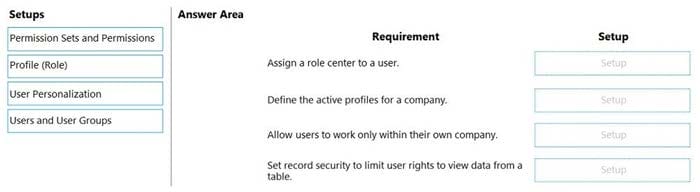
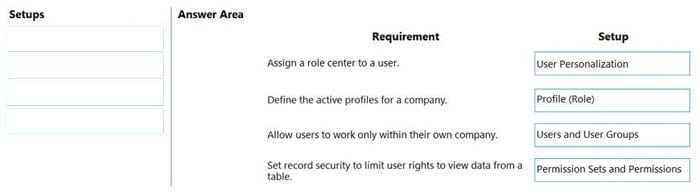
You manage several companies within one Dynamics 365 Business Central database. Most users work in only one of these companies, where they have a specific role.
You need to set up security according to company requirements.
Which setup should you use? To answer, drag the appropriate setups to the correct requirements. Each setup may be used once, more than once, or not at all. You may need to drag the split bar between panes or scroll to view content.
NOTE: Each correct selection is worth one point.
Select and Place:
Questions 5
DRAG DROP
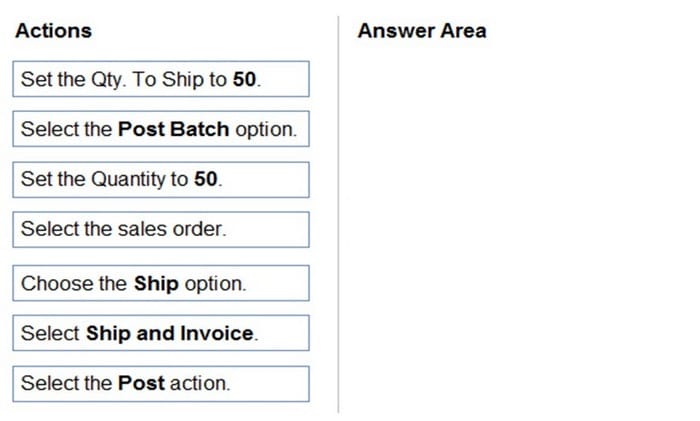
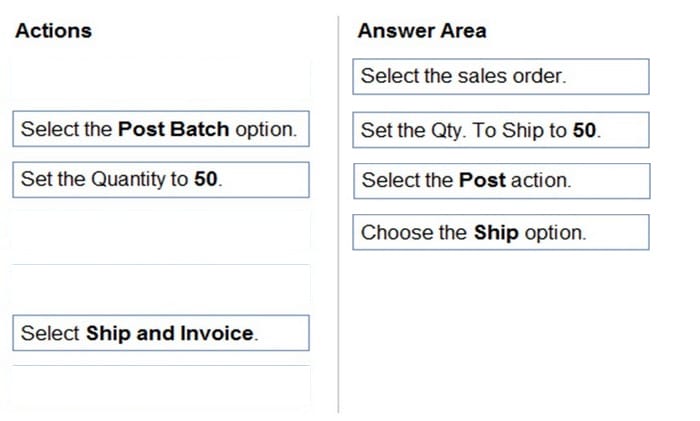
You have a sales order with a quantity of 100 items.
You need to post a shipment with a quantity of 50 items from the sales order.
Which four actions should you perform in sequence? To answer, move the appropriate actions from the list of actions to the answer area and arrange them in the correct order.
Select and Place:
Questions 6
HOTSPOT
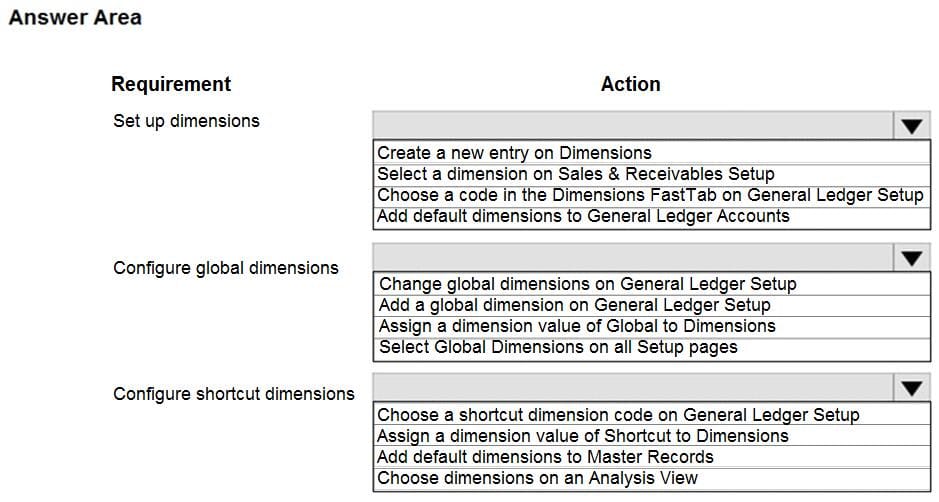
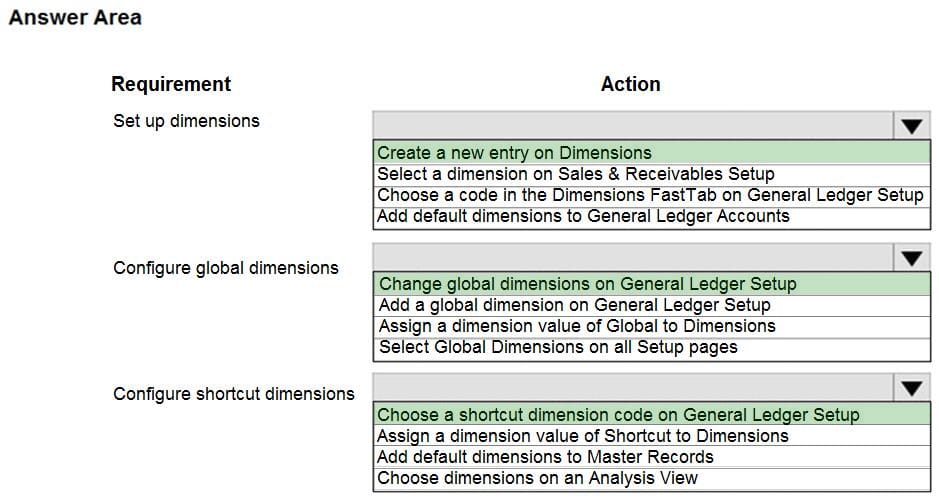
You need to configure reporting.
What should you do? To answer, select the appropriate options in the answer area.
NOTE: Each correct selection is worth one point.
Hot Area:
Questions 7
A user reports that they cannot create or view sales quotes in Dynamics 365 Business Central.
You need to help the user create and view sales quotes.
From which three cards can the user perform the required activities? Each correct answer presents a complete solution.
NOTE: Each correct selection is worth one point.
A. Service Item
B. Opportunity
C. Job
D. Resource
E. Customer
F. Contact
Questions 8
A company operates from India. The company procures materials from Sweden.
You need to set up invoice discount terms for a vendor based in Sweden.
Which three pieces of information should you enter? Each correct answer presents part of the solution.
NOTE: Each correct selection is worth one point.
A. currency code
B. minimum amount
C. discount percentage
D. starting date
E. minimum quantity
Questions 9
After you answer a question in this section, you will NOT be able to return to it. As a result, these questions will not appear in the review screen.
You are configuring default reports and layouts in Dynamics 365 Business Central.
You must add new data items to the report and change the layout associated with the default Purchase Order report.
A developer creates and deploys a new report object that includes the new data items and layout.
You need to configure Business Central to use the new report object as the system default when printing purchase orders.
Solution: On the Report Layout Selection page, select the new report object. Update the value to Custom Layout and select the updated layout.
Does the solution meet the goal?
A. Yes
B. No
Questions 10
A company is implementing Dynamics 365 Business Central.
Vendor open balances need to be posted to the general ledger (G/L) account directly by using the general journal.
You need to configure the G/L account to allow users to post vendor open balances to payables accounts.
Which setting should you use?
A. Account Category
B. Income/Balance
C. Default Deferral template
D. Direct Posting
Questions 11
A company uses Dynamics 365 Business Central.
An accountant must post sales services in a journal by using a predefined alphanumeric sequence. The accountant is using multiple general journal batches.
You need to configure invoice numbers for the journal.
Which two fields should you populate? Each correct answer presents part of the solution.
NOTE: Each correct selection is worth one point.
A. Posting No. Series field in General Journal Templates
B. No. Series field in General Journal Batches
C. No. Series field in General Journal Templates
D. Posting No. Series field in General Journal Batches
Questions 12
You need to configure the system to meet the requirements for sending invoices.
Which three actions should you perform? Each correct answer presents part of the solution.
NOTE: Each correct selection is worth one point.
A. Set Email to Yes (Use Default Settings).
B. Allow Sender Substitution for SMTP Mail Setup.
C. Set Email to Yes (Prompt for Settings).
D. Assign a Document Sending Profile to the Customer where Email is set to No.
E. Apply Office Server Settings to the SMTP Mail Setup.
F. Assign a Document Sending Profile to the Customer where Email is set to Yes.
Questions 13
You need to configure the system to meet the requirements for received items. What should you do?
A. Set the default costing method to Standard
B. Turn on Automatic Cost Posting
C. Turn on Expected Cost Posting
D. Set the value of the Automatic Cost Adjustment option to Always


Home | About Us | Contact Us | FAQ | Guarantee Policy | Privacy Policy
Any charges made through this site will appear as Global Simulators Limited. All trademarks are the property of their respective owners.
Copyright © 2004-2026 pass2lead.com, All Rights Reserved.