

NSE5_FMG-6.4 Online Practice Questions and Answers
Questions 4
Which two conditions trigger FortiManager to create a new revision history? (Choose two.)
A. When configuration revision is reverted to previous revision in the revision history
B. When FortiManager installs device-level changes to a managed device
C. When FortiManager is auto-updated with configuration changes made directly on a managed device
D. When changes to device-level database is made on FortiManager
Questions 5
An administrator would like to review, approve, or reject all the firewall policy changes made by the junior administrators.
How should the Workspace mode be configured on FortiManager?
A. Set to workflow and use the ADOM locking feature
B. Set to read/write and use the policy locking feature
C. Set to normal and use the policy locking feature
D. Set to disable and use the policy locking feature
Questions 6
Which two settings must be configured for SD-WAN Central Management? (Choose two.)
A. SD-WAN must be enabled on per-ADOM basis
B. You can create multiple SD-WAN interfaces per VDOM
C. When you configure an SD-WAN, you must specify at least two member interfaces.
D. The first step in creating an SD-WAN using FortiManager is to create two SD-WAN firewall policies.
Questions 7
Which two statements about the scheduled backup of FortiManager are true? (Choose two.)
A. It does not back up firmware images saved on FortiManager.
B. It can be configured using the CLI and GUI.
C. It backs up all devices and the FortiGuard database.
D. It supports FTP, SCP, and SFTP.
Questions 8
Refer to the exhibits. Exhibit one.
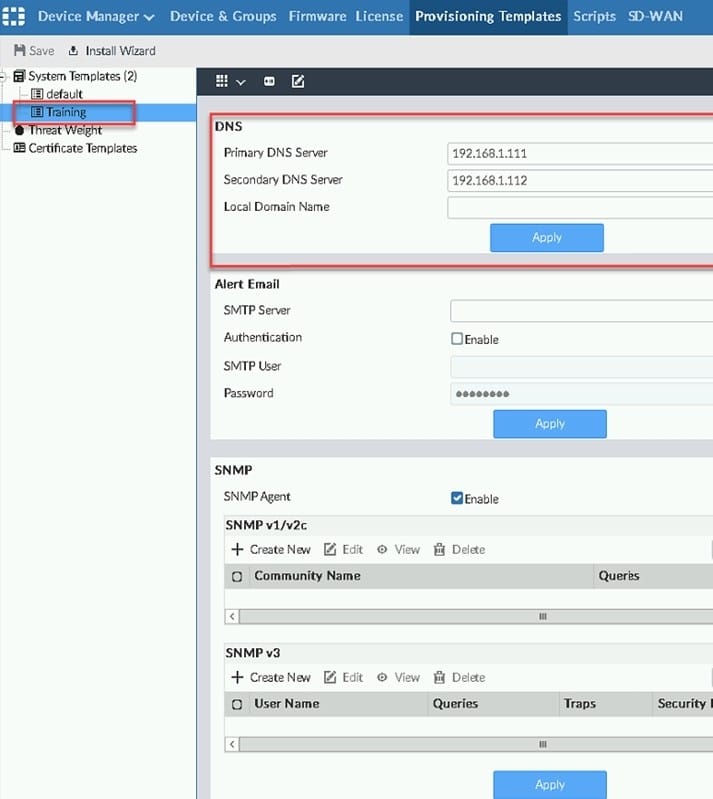
Exhibit two.

An administrator created a new system template named Training with two new DNS addresses on
FortiManager. During the installation preview stage, the administrator notices that many unset commands
need to be pushed.
What can be the main reason for these unset commands?
A. The DNS addresses in the default system settings are the same as the Training system template
B. The Training system template has other default settings
C. The ADOM is locked by another administrator
D. The Training system template does not have assigned devices
Questions 9
Refer to the exhibit.
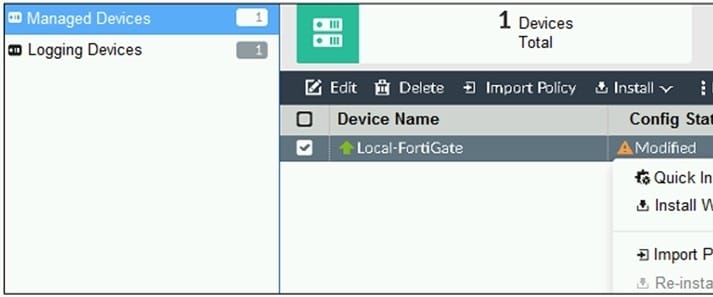
You are using the Quick Install option to install configuration changes on the managed FortiGate.
Which two statements correctly describe the result? (Choose two.)
A. It will not create a new revision in the revision history
B. It installs device-level changes to FortiGate without launching the Install Wizard
C. It cannot be canceled once initiated and changes will be installed on the managed device
D. It provides the option to preview configuration changes prior to installing them
Questions 10
View the following exhibit:
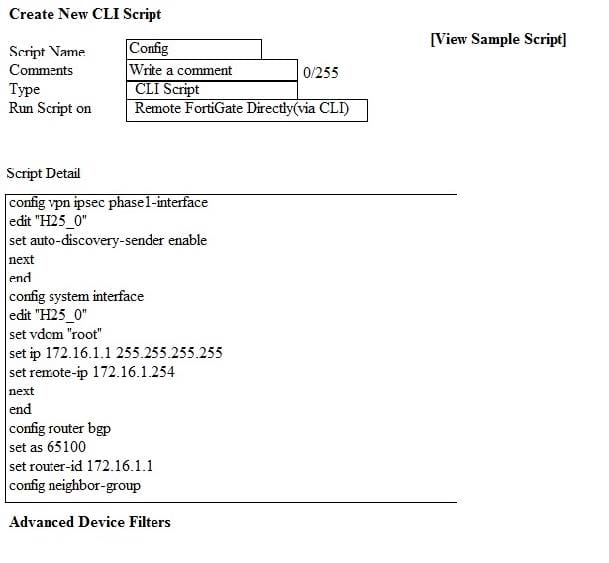
Which two statements are true if the script is executed using the Remote FortiGate Directly (via CLI) option? (Choose two.)
A. You must install these changes using Install Wizard
B. FortiGate will auto-update the FortiManager's device-level database.
C. FortiManager will create a new revision history.
D. FortiManager provides a preview of CLI commands before executing this script on a managed FortiGate.
Questions 11
View the following exhibit.
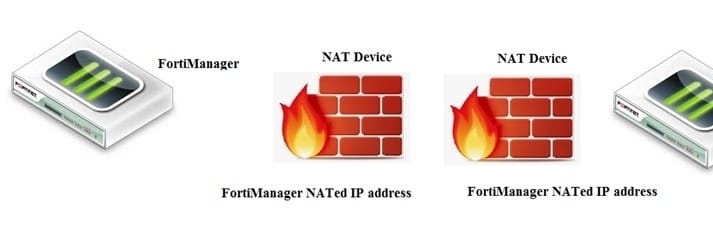
If both FortiManager and FortiGate are behind the NAT devices, what are the two expected results? (Choose two.)
A. FortiGate is discovered by FortiManager through the FortiGate NATed IP address.
B. FortiGate can announce itself to FortiManager only if the FortiManager IP address is configured on FortiGate under central management.
C. During discovery, the FortiManager NATed IP address is not set by default on FortiGate.
D. If the FCFM tunnel is torn down, FortiManager will try to re-establish the FGFM tunnel.
Questions 12
Refer to the exhibit.
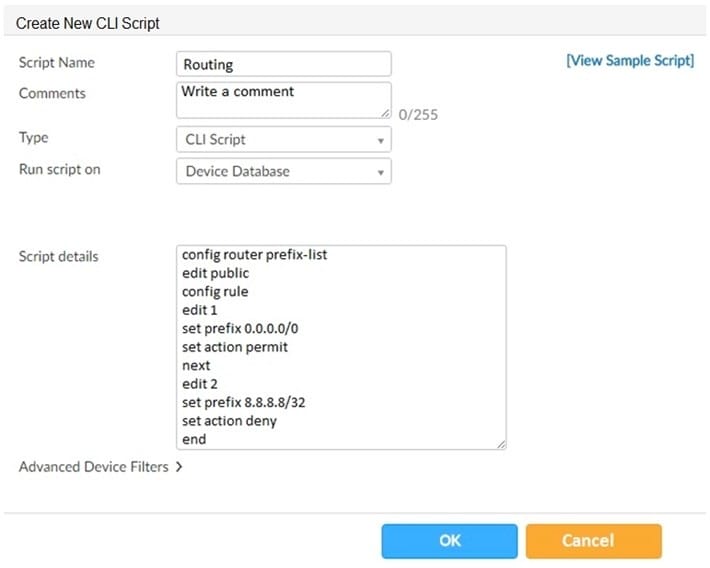
Which two statements are true if the script is executed using the Device Database option? (Choose two.)
A. You must install these changes using the Install Wizard to a managed device
B. The successful execution of a script on the Device Database will create a new revision history
C. The script history will show successful installation of the script on the remote FortiGate
D. The Device Settings Status will be tagged as Modified
Questions 13
Refer to the exhibit.
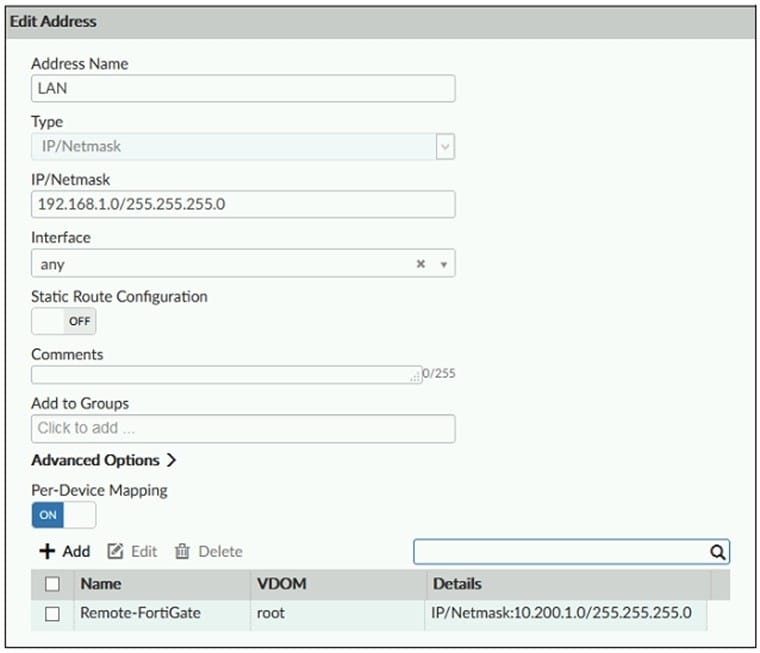
An administrator has created a firewall address object, Training which is used in the Local- FortiGate policy package.
When the installation operation is performed, which IP/Netmask will be installed on the Local-FortiGate, for the Training firewall address object?
A. 192.168.0.1/24
B. 10.200.1.0/24
C. It will create a firewall address group on Local-FortiGate with 192.168.0.1/24 and 10.0.1.0/24 object values.
D. Local-FortiGate will automatically choose an IP/Netmask based on its network interface settings.


Home | About Us | Contact Us | FAQ | Guarantee Policy | Privacy Policy
Any charges made through this site will appear as Global Simulators Limited. All trademarks are the property of their respective owners.
Copyright © 2004-2026 pass2lead.com, All Rights Reserved.