

SC-300 Online Practice Questions and Answers
Questions 4
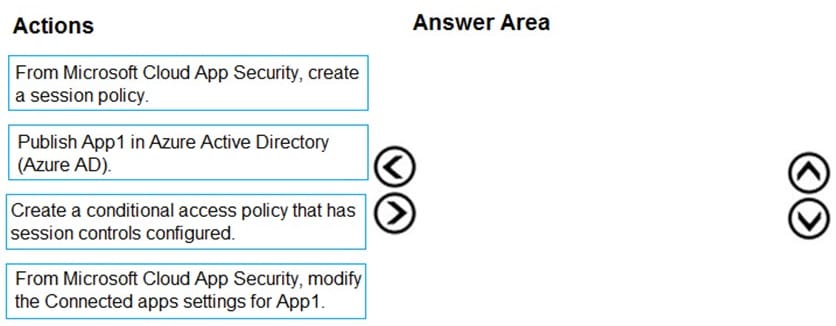
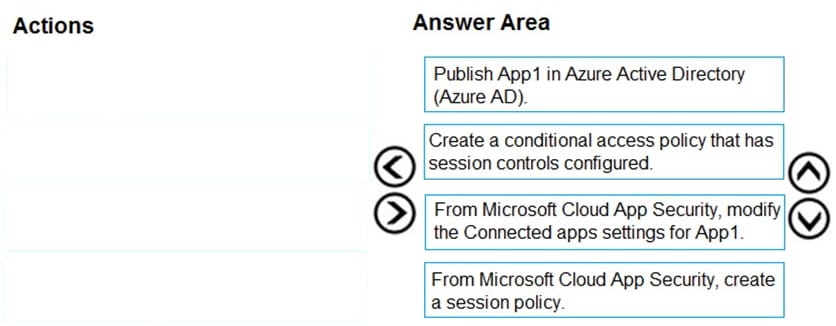
DRAG DROP
You have a Microsoft 365 E5 tenant.
You purchase a cloud app named App1.
You need to enable real-time session-level monitoring of App1 by using Microsoft Cloud App Security.
In which order should you perform the actions? To answer, move the appropriate actions from the list of actions to the answer area and arrange them in the correct order.
Select and Place:
Questions 5
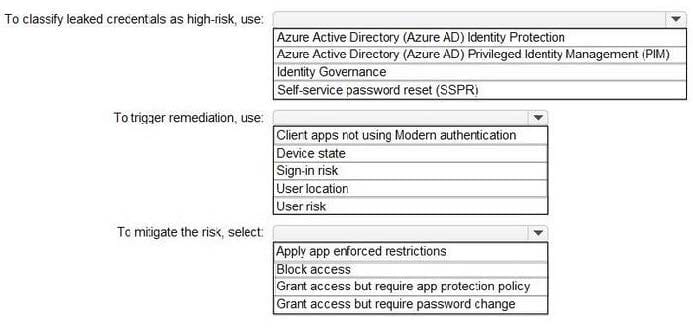
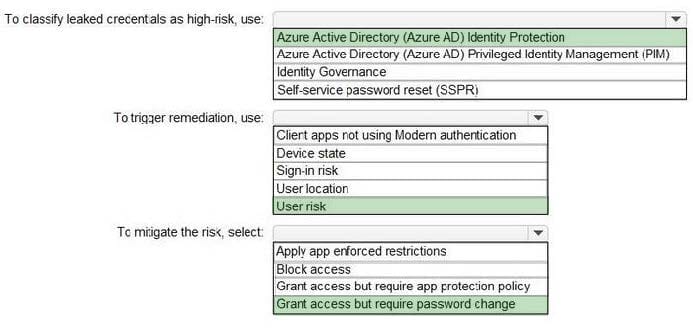
HOTSPOT
You have a Microsoft 365 tenant.
You need to identify users who have leaked credentials. The solution must meet the following requirements.
1.
Identity sign-Ins by users who ate suspected of having leaked credentials.
2.
Rag the sign-ins as a high risk event.
3.
Immediately enforce a control to mitigate the risk, while still allowing the user to access applications.
What should you use? To answer, select the appropriate options in the answer area. NOTE: Each correct selection is worth one point.
Hot Area:
Questions 6
HOTSPOT
You have a Microsoft 365 tenant.
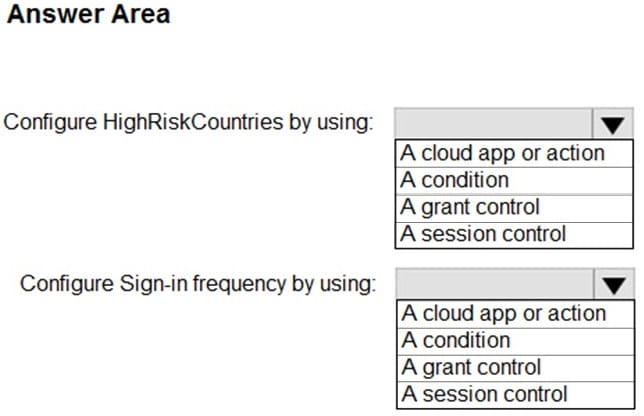
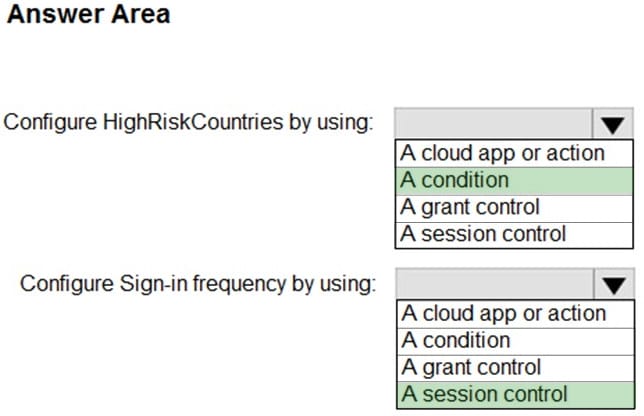
You create a named location named HighRiskCountries that contains a list of high-risk countries.
You need to limit the amount of time a user can stay authenticated when connecting from a high-risk country.
What should you configure in a conditional access policy? To answer, select the appropriate options in the answer area.
NOTE: Each correct selection is worth one point.
Hot Area:
Questions 7
You have a Microsoft 365 tenant.
The Azure Active Directory (Azure AD) tenant syncs to an on-premises Active Directory domain.
You plan to create an emergency-access administrative account named Emergency1.
Emergency1 will be assigned the Global administrator role in Azure AD. Emergency1 will be used in the event of Azure AD functionality failures and on-premises infrastructure failures.
You need to reduce the likelihood that Emergency1 will be prevented from signing in during an emergency.
What should you do?
A. Configure Azure Monitor to generate an alert if Emergency1 is modified or signs in.
B. Require Azure AD Privileged Identity Management (PIM) activation of the Global administrator role for Emergency1.
C. Configure a conditional access policy to restrict sign-in locations for Emergency1 to only the corporate network.
D. Configure a conditional access policy to require multi-factor authentication (MFA) for Emergency1.
Questions 8
You have a Microsoft 365 tenant.
All users have mobile phones and laptops.
The users frequently work from remote locations that do not have Wi-Fi access or mobile phone connectivity. While working from the remote locations, the users connect their laptop to a wired network that has internet access.
You plan to implement multi-factor authentication (MFA).
Which MFA authentication method can the users use from the remote location?
A. a notification through the Microsoft Authenticator app
B. an app password
C. Windows Hello for Business
D. SMS
Questions 9
Your network contains an on-premises Active Directory domain that syncs to an Azure Active Directory (Azure AD) tenant. The tenant contains the users shown in the following table.
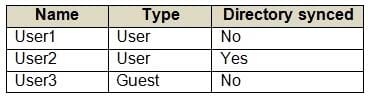
All the users work remotely.
Azure AD Connect is configured in Azure AD as shown in the following exhibit.
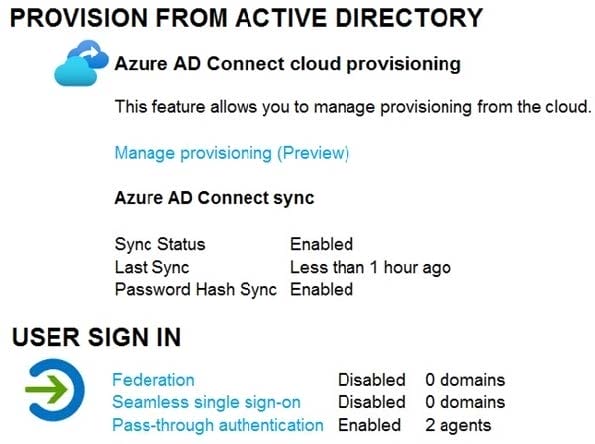
Connectivity from the on-premises domain to the internet is lost. Which users can sign in to Azure AD?
A. User1 only
B. User1 and User 3 only
C. User1, and User2 only
D. User1, User2, and User3
Questions 10
Note: This question is part of a series of questions that present the same scenario. Each question in the series contains a unique solution that might meet the stated goals. Some question sets might have more than one correct solution, while
others might not have a correct solution.
After you answer a question in this section, you will NOT be able to return to it. As a result, these questions will not appear in the review screen.
You have a Microsoft 365 tenant.
All users must use the Microsoft Authenticator app for multi-factor authentication (MFA) when accessing Microsoft 365 services. Some users report that they received an MFA prompt on their Microsoft Authenticator app without initiating a
sign-in request.
You need to block the users automatically when they report an MFA request that they did not initiate. Solution: From the Azure portal, you configure the Notifications settings for multi-factor authentication (MFA). Does this meet the goal?
A. Yes
B. No
Questions 11
You use Azure Monitor to analyze Azure Active Directory (Azure AD) activity logs.
Yon receive more than 100 email alerts each day for tailed Azure Al) user sign-in attempts.
You need to ensure that a new security administrator receives the alerts instead of you. Solution: From Azure AD, you create an assignment for the Insights at administrator role. Does this meet the goal?
A. Yes
B. No
Questions 12
You have an Azure Active Directory (Azure AD) tenant that contains the users shown in the following table.
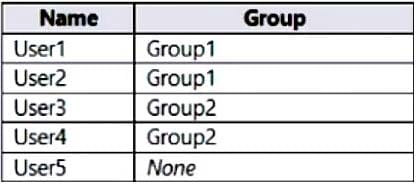
You have an administrative unit named Au1. Group1, User2, and User3 are members of Au1.
User5 is assigned the User administrator role for Au1.
For which users can User5 reset passwords?
A. User1, User2, and User3
B. User1 and User2 only
C. User3 and User4 only
D. User2 and User3 only
Questions 13
Your network contains an on-premises Active Directory domain that syncs to an Azure AD tenant.
Users sign in to computers that run Windows 10 and are joined to the domain.
You plan to implement Azure AD Seamless Single Sign-On (Azure AD Seamless SSO).
You need to configure the Windows 10 computers to support Azure AD Seamless SSO.
What should you do?
A. Modify the Local intranet zone settings
B. Configure Sign-in options from the Settings app.
C. Enable Enterprise State Roaming.
D. Install the Azure AD Connect Authentication Agent.


Home | About Us | Contact Us | FAQ | Guarantee Policy | Privacy Policy
Any charges made through this site will appear as Global Simulators Limited. All trademarks are the property of their respective owners.
Copyright © 2004-2026 pass2lead.com, All Rights Reserved.