


 Printable PDF

Adobe Illustrator CC Recertification Exam: 9A0-351
Want to pass your Adobe Illustrator CC Recertification Exam 9A0-351 exam in the very first attempt? Try Pass2lead! It is equally effective for both starters and IT professionals.
- Vendor: Adobe
- Exam Code: 9A0-351
- Exam Name: Adobe Illustrator CC Recertification Exam
- Certifications: Adobe Certifications
- Total Questions: 51 Q&As
- Updated on: Jul 07, 2026
- Note: Product instant download. Please sign in and click My account to download your product.




- Q&As Identical to the VCE Product
- Windows, Mac, Linux, Mobile Phone
- Printable PDF without Watermark
- Instant Download Access
- Download Free PDF Demo
- Includes 365 Days of Free Updates
VCE
- Q&As Identical to the PDF Product
- Windows Only
- Simulates a Real Exam Environment
- Review Test History and Performance
- Instant Download Access
- Includes 365 Days of Free Updates
Passing Certification Exams Made Easy
Everything you need prepare and quickly pass the tough certification exams the first time
- 99.5% pass rate
- 7 Years experience
- 7000+ IT Exam Q&As
- 70000+ satisfied customers
- 365 days Free Update
- 3 days of preparation before your test
- 100% Safe shopping experience
- 24/7 Support
Adobe 9A0-351 Last Month Results
Free 9A0-351 Exam Questions in PDF Format
Related Adobe Certifications Exams
9A0-351 Online Practice Questions and Answers
Questions 1
You are designing assets for the user interface of an OS X application, but the type you set in Illustrator doesn't match up well with how type looks in the operating system. How should you adjust the type?
A. In the OpenType panel, choose the Contextual Alternates option.
B. In the Character panel, choose an Anti-Aliasing Method.
C. In the Appearance panel, choose Rasterize from the Effects menu.
D. In the Paragraph panel, choose a Justification option.
Questions 2
You have generated CSS in your design, and in the CSS Properties Panel you want to paste one character style's CSS code into a web design application. How should you transfer the code?
A. Right+click on a style and choose Export Options from the context menu.
B. Right+click on a style and choose Generate CSS from the context menu.
C. Select a style, then click the Export Selected CSS button.
D. Select a style, then click the Copy Selected Style button.
Questions 3
Click the Exhibit tab to see the exhibit.
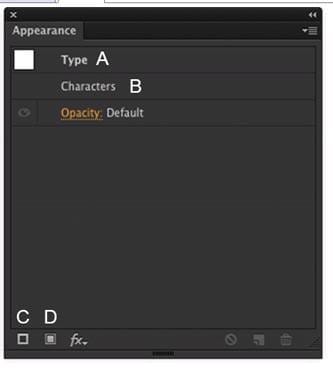
How should you modify an existing fill for text using the Appearance panel?
A. Double-click Type (A).
B. Double-click Characters (B).
C. Click the Add New Stroke button (C).
D. Click the Add New Fill button (D).
Reviews
-
IMlegend
 Indiai'm very happy that i passed the exam successfully. Recommend.
 -
Danilo
 United StatesI pass today, The dumps is good. 90% questions are from this dumps. so it is enough for the exam as long as you study this dumps carefully and do the all questions especially the new questions.
 -
Carlos
 United KingdomI purchased the dumps one month ago and I learned a lot from the dumps. I will attend the exam tomorrow, I feel very confident now. Good luck to me.
 -
Kim
 CambodiaI appreciated this dumps not only because it helped me pass the exam, but also because I learned much knowledge and skills. Thanks very much.
 -
Cadman
 GreeceI'm feeling luck because there are no new questions! All the questions are form this dumps!!! Thanks for your help! Thank you all !!!
 -
Lychee
United StatesPass 1000/1000, this dumps is still valid. thanks all. -
Tom
United StatesRecommend this dumps to you strongly, really useful and convenient. -
zuher
Indiathe content update quickly, there are many new questions in this dumps. thanks very much. -
King
United Kingdomhi guys, thanks for your help. I passed the exam with good score yesterday. Thanks a million. -
Sammy
 NigeriaPassed today with full score. I prepare only with this dumps. Valid.



Home | About Us | Contact Us | FAQ | Guarantee Policy | Privacy Policy
Any charges made through this site will appear as Global Simulators Limited. All trademarks are the property of their respective owners.
Copyright © 2004-2026 pass2lead.com, All Rights Reserved.