


 Printable PDF

Jira Administrator: ACP-100
Want to pass your Jira Administrator ACP-100 exam in the very first attempt? Try Pass2lead! It is equally effective for both starters and IT professionals.
- Vendor: Atlassian
- Exam Code: ACP-100
- Exam Name: Jira Administrator
- Certifications: Atlassian Certifications
- Total Questions: 72 Q&As( View Details)
- Updated on: Jul 05, 2026
- Note: Product instant download. Please sign in and click My account to download your product.




- Q&As Identical to the VCE Product
- Windows, Mac, Linux, Mobile Phone
- Printable PDF without Watermark
- Instant Download Access
- Download Free PDF Demo
- Includes 365 Days of Free Updates
VCE
- Q&As Identical to the PDF Product
- Windows Only
- Simulates a Real Exam Environment
- Review Test History and Performance
- Instant Download Access
- Includes 365 Days of Free Updates
Passing Certification Exams Made Easy
Everything you need prepare and quickly pass the tough certification exams the first time
- 99.5% pass rate
- 7 Years experience
- 7000+ IT Exam Q&As
- 70000+ satisfied customers
- 365 days Free Update
- 3 days of preparation before your test
- 100% Safe shopping experience
- 24/7 Support
Atlassian ACP-100 Last Month Results
Free ACP-100 Exam Questions in PDF Format
Related Atlassian Certifications Exams
ACP-100 Online Practice Questions and Answers
Questions 1
The configuration details of an SMTP Mail Server of a Jira instance are shown below. The configuration hasn't been changed in the last 24 months.
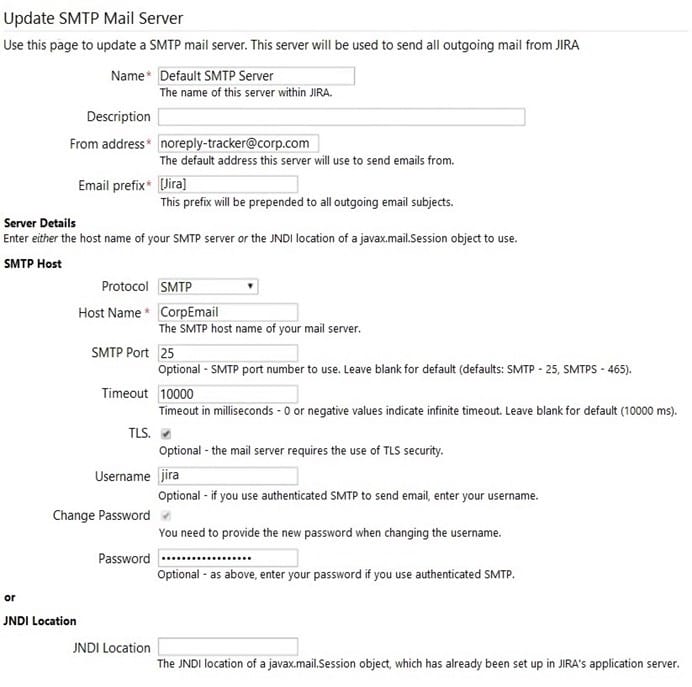
Currently emails are no longer being sent and the failed notifications can be seen in the Mail Error Queue.
What is the likely cause of the failure?
A. Email volume has increased and the Timeout is too low.
B. The SMTP password has expired.
C. The user jira has no valid Jira license.
D. The database and/or server disk is full.
E. The Jira license has expired.
Questions 2
Critical production bugs in a Jira Software project are hidden with an issue security scheme that has a single security level.
Only project administrators are listed in the security level and granted the Set Issue Security permission.
A new requirement states that a few other Jira Core users, who have Browse Projects permission, should be able to see the hidden issues. These users will vary per issue and be selected from across various groups.
What needs to be added to the security level?
A. Application access
B. User custom field value
C. Group custom field value
D. Project role
E. Single Users
F. Group
Questions 3
A project is using the Approval workflow shown.
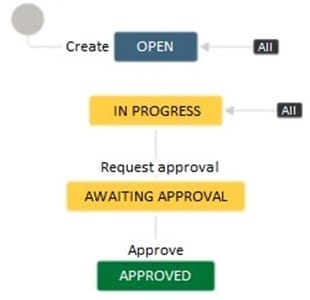
The project lead has communicated the following change requests:
It should be possible to transition issues into the Awaiting Approval status from any other status apart from
the Approved status.
Different transition screens will be needed for each transition into the Awaiting Approval status.
How do you configure the workflow to satisfy these requirements?
A. Create a global transition to the Awaiting Approval status. Create multiple appropriate transition screens and associate it with the global transition.
B. Reuse the Request approval transition between the Open and Awaiting Approval status. Create an appropriate transition screen and associate it with the transition.
C. Create a transition from the Open to the Awaiting Approval status. Create appropriate transition screens and associate them with the individual transitions into the Awaiting Approval status.
D. Create a global transition to the Awaiting Approval status. Create an appropriate transition screen and associate it with the global transition.
E. Create a transition from the Open to the Awaiting Approval status. Reuse the existing transition screen from the Request approval transition.
Reviews
-
Ziaul
 IndiaThanks i have passed my exam.Dump update quickly and many new questions that i met in this dumps came out in the exam, so i finished very quickly and correctly. Recommend.
 -
Zumar
IndiaI have passed the exam with their dumps. Thanks a million! -
Butt
 PolandAbsolutely valid. i passed today. You are the best. Thanks so much.
 -
Deere
 Russian FederationValid. All questions from the exam, some have different order of the answers. so be careful during the exam.
 -
Lloyd
 Pakistanthis dumps is valid. All questions that I met in the exam are from this dumps !!!
 -
Roger
 United StatesAs for me , this dumps is very useful and convenient, I can find my disadvantages easily and know how to correct them. I also can learn new skills and knowledge by using this dumps. I think you also can do it. I have test it so you can trust on it.
 -
zera
 SwedenPassed today with 938. There are a lot of D&D but only 3-4 new. Thank you all!
 -
King
 United Kingdomhi guys, thanks for your help. I passed the exam with good score yesterday. Thanks a million.
 -
Nick
 PortugalPassed with unexpected score. A big surprise. Thanks very much.
 -
Talon
United StatesStill valid!! 97%



Home | About Us | Contact Us | FAQ | Guarantee Policy | Privacy Policy
Any charges made through this site will appear as Global Simulators Limited. All trademarks are the property of their respective owners.
Copyright © 2004-2026 pass2lead.com, All Rights Reserved.