

 Printable PDF

Salesforce Certified Omnistudio Developer (Plat-Dev-210): OMNISTUDIO-DEVELOPER
Want to pass your Salesforce Certified Omnistudio Developer (Plat-Dev-210) OMNISTUDIO-DEVELOPER exam in the very first attempt? Try Pass2lead! It is equally effective for both starters and IT professionals.
- Vendor: Salesforce
- Exam Code: OMNISTUDIO-DEVELOPER
- Exam Name: Salesforce Certified Omnistudio Developer (Plat-Dev-210)
- Certifications: Salesforce Certifications
- Total Questions: 102 Q&As( View Details)
- Updated on: Jul 06, 2026
- Note: Product instant download. Please sign in and click My account to download your product.




- Q&As Identical to the VCE Product
- Windows, Mac, Linux, Mobile Phone
- Printable PDF without Watermark
- Instant Download Access
- Download Free PDF Demo
- Includes 365 Days of Free Updates
VCE
- Q&As Identical to the PDF Product
- Windows Only
- Simulates a Real Exam Environment
- Review Test History and Performance
- Instant Download Access
- Includes 365 Days of Free Updates
Passing Certification Exams Made Easy
Everything you need prepare and quickly pass the tough certification exams the first time
- 99.5% pass rate
- 7 Years experience
- 7000+ IT Exam Q&As
- 70000+ satisfied customers
- 365 days Free Update
- 3 days of preparation before your test
- 100% Safe shopping experience
- 24/7 Support
Salesforce OMNISTUDIO-DEVELOPER Last Month Results
Free OMNISTUDIO-DEVELOPER Exam Questions in PDF Format
Related Salesforce Certifications Exams
OMNISTUDIO-DEVELOPER Online Practice Questions and Answers
Questions 1
Refer to the exhibit.
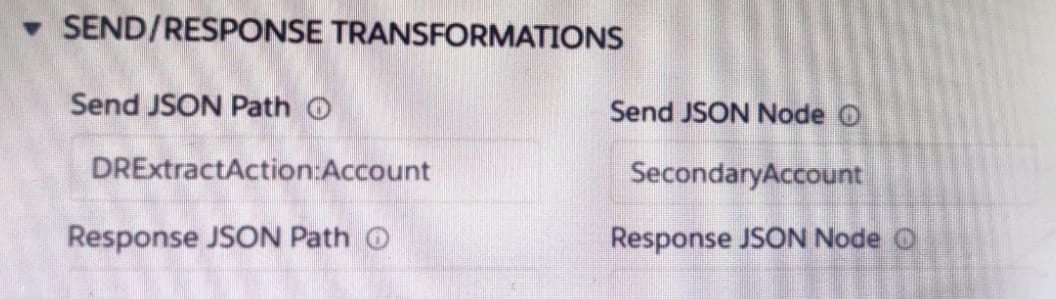
A developer has configured an integration Procedure element with SEND/RESPONSE TRANFORMATIONS as shown.
Alternatively, how could the developer configure Additional input to send exactly the same data? Assume that the developer checked Send Only Additional input.
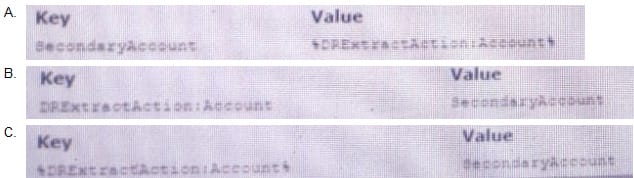
A. Option A
B. Option B
C. Option C
Questions 2
A developer has an existing DataRaptor Load that insert Contact records with inputs as LastName and firstName. The DataRaptor works as expected when previewed.
The developer creates an integration Procedure to test the DataRaptor and is using a SetValues element in the Integration Procedure to set the first name and last name for the contact record. The DataRaptor and Integration Procedure are set up as shown in the exhibit below.
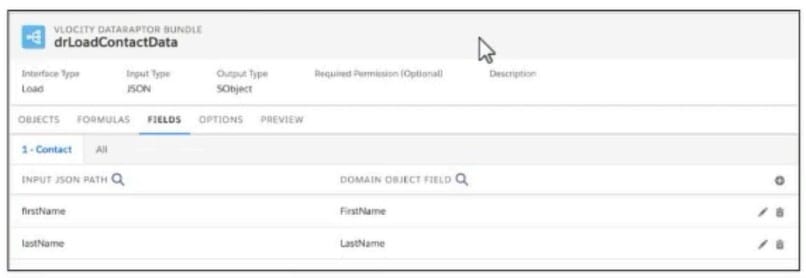
When the developer executes the Integration procedure in preview, the following error message displays: Required fields are missing: [last Name]'', How should the developer address this issue?
A. SetValuesContactDetails should have been added to Additional input of DataRaptor Post Action in Integration Procedure
B. The Set values Action Keys should include the DataRaptor Post Action element name path, e,g LoadContactDetails, lastname
C. The DataRaptor Post Action in the integration procedure should have been executed before the Set Values Action
D. The valid field names should be added in the Domain object field in the DataRaptor
Questions 3
A developer needs to transform contact data into a JSON array.
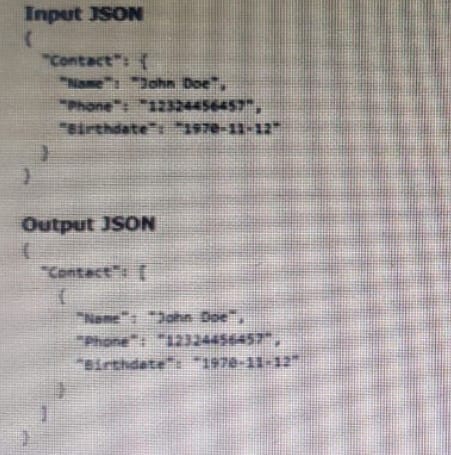
Given the input JSON shown above, what are two ways a developer could configure a DATARaptor transform to achieve the expected Output JSON? Choose 2 answers
A. Use a formula LIST(Contact), and add the output of the formula as the input in the Transform tab.
B. Set the Input JSON path as List(Contact) and the OutputJSON Path as Contact.
C. Set the Input JSON Path as Contact the out JSON Path as contact and output Data type as List.
D. Set the input JSON Path as Contact and the OutPut JSON Path as List (Contact)
Reviews
-
Cael
 GreeceGreat dumps ! Thanks a million.
 -
zel
 Sri LankaI'm so happy that I passed exam this week. Thanks for this study material and my friend's recommendation.
 -
Olsen
 United StatesOne of my friends told me that your dumps are good and I purchased it. Great. I passed my exam with it. Nice work, guys.
 -
Lloyd
 Pakistanthis dumps is valid. All questions that I met in the exam are from this dumps !!!
 -
Nick
 PortugalPassed with unexpected score. A big surprise. Thanks very much.
 -
ziad
 South AfricaValid dumps, recommend strongly.
 -
Ziaul huque
 New ZealandThis study material is very useful and effective, if you have not much time to prepare for your exam, this study material is your best choice.
 -
Banne
 Nigeriatook the exams yesterday and passed. I was very scared at first because the labs came in first so I was spending like 10 to 13mins so I started rushing after the first three labs thinking that I will have more labs. I ended up finishing the exam in an hour..d dumps are valid. I tink there is a new lab. good success
 -
shok
 AustraliaYes this valid. Passed today 982/1000. Same questions.
 -
ER
 IndonesiaThis Dump is 100% valid, Pass today. Dump valid.



Home | About Us | Contact Us | FAQ | Guarantee Policy | Privacy Policy
Any charges made through this site will appear as Global Simulators Limited. All trademarks are the property of their respective owners.
Copyright © 2004-2026 pass2lead.com, All Rights Reserved.