


 Printable PDF

Professional Cloud Architect on Google Cloud Platform: PROFESSIONAL-CLOUD-ARCHITECT
Want to pass your Professional Cloud Architect on Google Cloud Platform PROFESSIONAL-CLOUD-ARCHITECT exam in the very first attempt? Try Pass2lead! It is equally effective for both starters and IT professionals.
- Vendor: Google
- Exam Code: PROFESSIONAL-CLOUD-ARCHITECT
- Exam Name: Professional Cloud Architect on Google Cloud Platform
- Certifications: Google Certifications
- Total Questions: 317 Q&As( View Details)
- Updated on: Jul 06, 2026
- Note: Product instant download. Please sign in and click My account to download your product.




- Q&As Identical to the VCE Product
- Windows, Mac, Linux, Mobile Phone
- Printable PDF without Watermark
- Instant Download Access
- Download Free PDF Demo
- Includes 365 Days of Free Updates
VCE
- Q&As Identical to the PDF Product
- Windows Only
- Simulates a Real Exam Environment
- Review Test History and Performance
- Instant Download Access
- Includes 365 Days of Free Updates
Passing Certification Exams Made Easy
Everything you need prepare and quickly pass the tough certification exams the first time
- 99.5% pass rate
- 7 Years experience
- 7000+ IT Exam Q&As
- 70000+ satisfied customers
- 365 days Free Update
- 3 days of preparation before your test
- 100% Safe shopping experience
- 24/7 Support
Google PROFESSIONAL-CLOUD-ARCHITECT Last Month Results
Free PROFESSIONAL-CLOUD-ARCHITECT Exam Questions in PDF Format
Related Google Certifications Exams
PROFESSIONAL-CLOUD-ARCHITECT Online Practice Questions and Answers
Questions 1
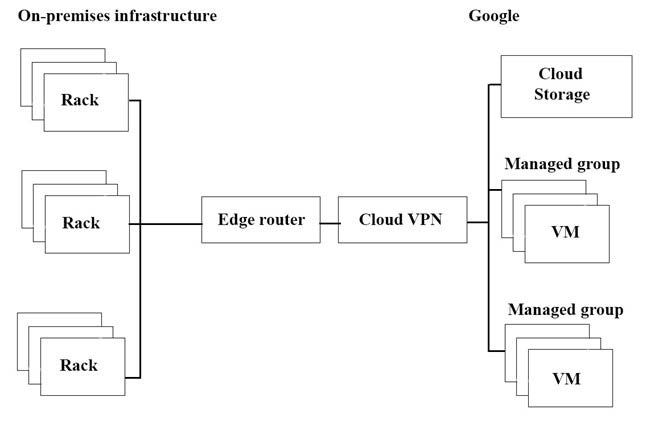
The migration of JencoMart's application to Google Cloud Platform (GCP) is progressing too slowly. The infrastructure is shown in the diagram. You want to maximize throughput. What are three potential bottlenecks? Choose 3 answers.
A. A single VPN tunnel, which limits throughput
B. A tier of Google Cloud Storage that is not suited for this task
C. A copy command that is not suited to operate over long distances
D. Fewer virtual machines (VMs) in GCP than on-premises machines
E. A separate storage layer outside the VMs, which is not suited for this task
F. Complicated internet connectivity between the on-premises infrastructure and GCP
Questions 2
For this question, refer to the Dress4Win case study. Considering the given business requirements, how would you automate the deployment of web and transactional data layers?
A. Deploy Nginx and Tomcat using Cloud Deployment Manager to Compute Engine. Deploy a Cloud SQL server to replace MySQL. Deploy Jenkins using Cloud Deployment Manager.
B. Deploy Nginx and Tomcat using Cloud Launcher. Deploy a MySQL server using Cloud Launcher. Deploy Jenkins to Compute Engine using Cloud Deployment Manager scripts.
C. Migrate Nginx and Tomcat to App Engine. Deploy a Cloud Datastore server to replace the MySQL server in a high-availability configuration. Deploy Jenkins to Compute Engine using Cloud Launcher.
D. Migrate Nginx and Tomcat to App Engine. Deploy a MySQL server using Cloud Launcher. Deploy Jenkins to Compute Engine using Cloud Launcher.
Questions 3
You write a Python script to connect to Google BigQuery from a Google Compute Engine virtual machine. The script is printing errors that it cannot connect to BigQuery. What should you do to fix the script?
A. Install the latest BigQuery API client library for Python
B. Run your script on a new virtual machine with the BigQuery access scope enabled
C. Create a new service account with BigQuery access and execute your script with that user
D. Install the bq component for gccloud with the command gcloud components install bq.
Reviews
-
souam
 MoroccoThere are many new questions in the dumps and the answers are accurate and correct. I finished my exam with high score this morning, thanks very much.
 -
zisa
 SingaporeValid study material.Recommend strongly.
 -
Ian
 United KingdomPaas my exam today. Valid dumps. Nice job!
 -
Parker
 HungaryA valid dumps. It helped me pass the exam in short time. Thanks a million.
 -
Hillary
HungaryI studied this material carefully and took every question seriously. At last, I passed the exam with high score. Prepare well and study much more. -
Dean
 MyanmarThis dumps is helpful and convenient, you can trust on it .Good luck to you.
 -
Li
 PakistanTest engine works fine. Pass my exam. Thank you.
 -
zia
PakistanI took my exam yesterday and passed. Questions are valid. Customer support was great. Thanks for your help. -
Bakery
 Turkeythere are 4 questions different. these are about t.shoot questions. but the rest is ok for pass. Good dumps.
 -
Sammy
 NigeriaPassed today with full score. I prepare only with this dumps. Valid.



Home | About Us | Contact Us | FAQ | Guarantee Policy | Privacy Policy
Any charges made through this site will appear as Global Simulators Limited. All trademarks are the property of their respective owners.
Copyright © 2004-2026 pass2lead.com, All Rights Reserved.